

app.kentron.ai; if you are not signed in, opening it takes you straight to the sign-up page.
A co-worker you give goals to
You talk to Receipt in the web app, in Slack, or in Microsoft Teams. Every message first goes through a router that does nothing but classify the turn. It returns one of three decisions:- Answer directly. A second pass writes the response you see in the thread.
- Author an organization skill. Receipt drafts or saves a reusable set of instructions for your organization. This route runs in the web app only.
- Run a durable background objective. Receipt queues the work and posts the result when the run settles; the web app and Slack also stream progress into the thread.
Receipt couldn't determine the access needed for this request. Please retry; no task was started.
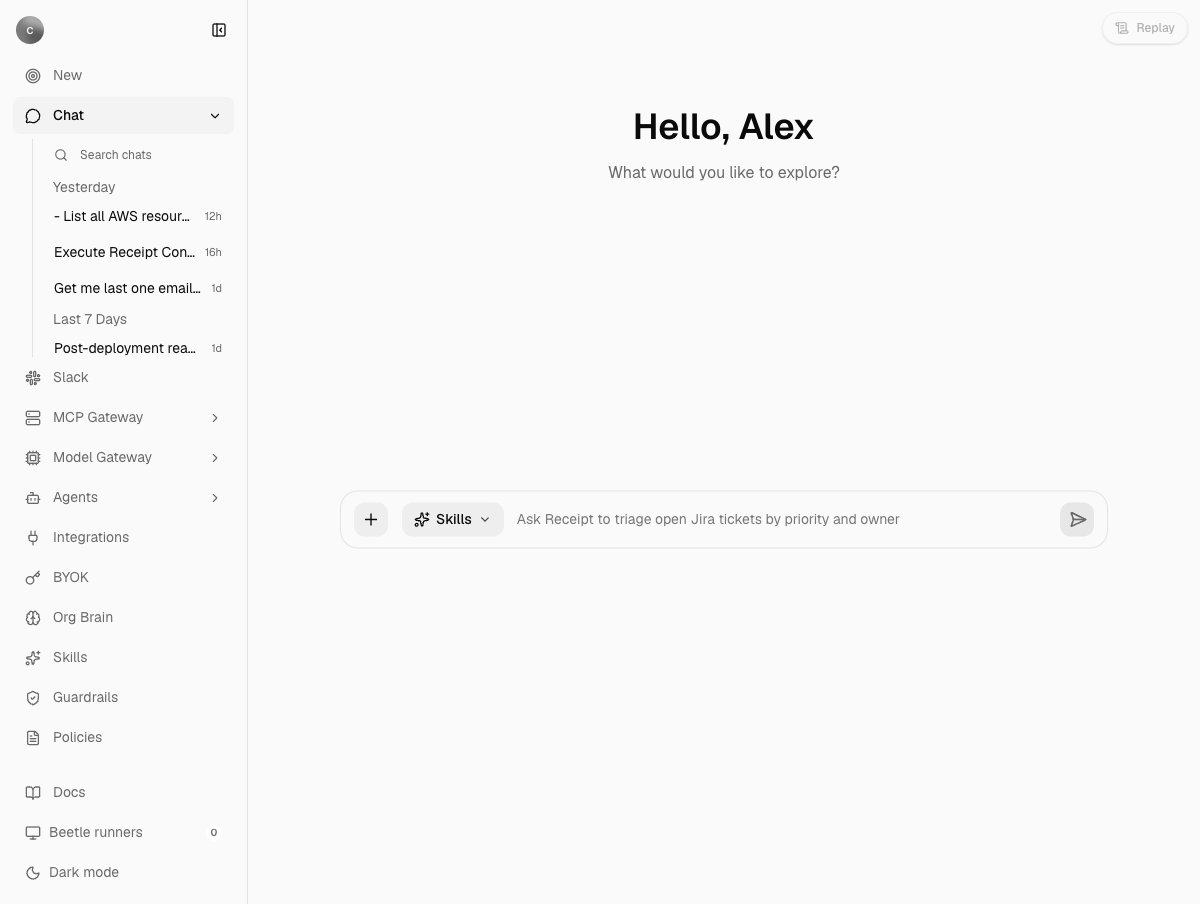
The chat home page as an owner or admin sees it: a greeting, the composer with its + menu, Skills chip and a rotating example prompt, a Replay button top right, and the Docs link and Beetle runners count in the sidebar footer. The recent-chat list under Chat is a scroll area, so its last row is clipped at the bottom edge. Members see a shorter sidebar.
Sending your message to Beetle..., the tasks page is titled Beetle Tasks, and the sidebar footer widget that counts sandbox capacity is Beetle runners. This documentation says Receipt, and quotes Beetle only where the screen shows it.
The gateways that govern models and tools
Two gateways sit between an agent and everything outside Receipt. The MCP Gateway holds your app connections. You connect an app once through Receipt Connect, an owner or admin decides per connection which operations agents may call, and Codex or any other MCP client uses those operations without ever holding a provider credential. Write operations are off until an owner or admin enables them; there is no per-action approval prompt in this release (tools and permissions). Provider credentials stay in Nango, so MCP client configs and sandboxes never contain them. The LLM Gateway is the checkpoint every model call Receipt itself makes passes through: which providers and models the organization allows, whose key pays for the call, and how much spend is pre-authorized. It is not a proxy; there is no external endpoint for other applications to send model traffic through.Receipts as proof
Receipt records its work in receipt streams: tamper-evident, SHA-256 hash-chained records in Postgres. Every background run and every action called through the gateway’s/connect/call route writes receipts; the pages that show tasks, runs and sessions are built from those streams; the runtime verifies the hash chain whenever it replays a stream and refuses one that does not check out. Calls made through the MCP bridge are not yet recorded (aggregate server).
The seven components
Receipt AI Co-Worker
Give Receipt a goal in chat, Slack or Teams; it answers or runs a background objective, and every step is a receipt you can replay.
MCP Gateway
Connect your apps once, decide which operations agents may call, and let any MCP client use them without holding a credential.
LLM Gateway
One policy and credential checkpoint for every model call Receipt makes: providers, models, your own keys, and spend.
Kentron Catalog
What your organization has: the AI agents found in your clouds, 63 connectable connectors inside a directory of about 900, your skills, and how all of it is used.
Kentron Guard
The controls between an agent and your systems, stating plainly which are enforced today and which are stored but not yet applied.
Kentron Core
The platform everything else runs on: accounts, organizations, billing, the receipt runtime, the API and SDK, configuration and self-hosting.
Receipt CLI
Sign in once with
receipt setup, pick a workspace, and use your connections from the terminal, from Codex, or from any MCP client.Which component do I need?
How it fits together
Every edge is backed by code: web chat goes through the LLM Gateway for direct answers and hands background work to Factory; Slack and Teams reach the same runtime through its channel-neutral routes; the CLI and MCP clients talk to the MCP Gateway, which Factory workers also call for credentials at run time; Nango holds the provider credentials; Zero syncs the receipt projections back to your browser. Guard’s enforced controls sit on the model and gateway paths.Get started
Create an account
Sign up on the hosted app; an organization is created for you.
Send your first chat
Ask a question, then hand over a task and watch it run.
Install the CLI
Put
receipt on your machine and sign in with receipt setup.