

The three roles
These roles are organization-wide; a Receipt workspace keeps its own membership and its own roles on top of them, covered under workspace authority below. Receipt uses the default role set from its authentication layer, so there are exactly three roles and no custom ones.
Whoever creates an organization becomes its owner.
Owner and admin are not distinguished by Receipt’s own admin check: every place Receipt asks “is this person an admin?” — guardrails, organization skills, policies, organization knowledge, the Slack and Teams installs, Stripe checkout and workspace mutations — accepts both identically. The difference between the two is deleting the organization, which only an owner can do — and no screen in the app offers it.
Who can open organization settings
This is the rule that surprises people. Every page under/organization/settings is owner and admin only, with one exception: paths that match the MCP gateway rule, which covers /organization/settings/mcp-gateway and /organization/settings/workspaces, are open to any organization member.
So a plain member can open Workspaces and the MCP Gateway, and cannot open Members, Billing, Usage, BYOK, Security, Policies or the rest.
The exception is deliberate. The code comment on the rule states the reasoning: organization settings stay owner/admin-only, while gateway workspaces use their own receipt-backed membership boundary — every member may reach the gateway shell, and the workspace list and token endpoints then expose only the workspaces where that person is a member.
The route gate is not the only check. Each feature enforces its own authorization on the server independently, with its own refusal:
The server-side admin check does not read the role from the session payload. It asks the authentication layer whether the caller holds the
organization: update permission in the active organization, and treats any failure as “not an admin”.
What a plain member sees
The sidebar hides every organization-settings destination from anyone who is not an owner or admin, and it fails closed while the role is still resolving — including immediately after switching organizations, so management navigation from the previous organization is never carried over. A member therefore does not see the Integrations, BYOK, Org Brain, Skills, Guardrails or Policies rail icons at all, and the only settings destination left in the organization menu behind the avatar is Account. Three areas are separate navigation areas rather than settings entries, so they survive that filter:- MCP Gateway — genuinely open to members, per the exception above. Its rail icon points straight at the Workspaces page, which is how a member reaches Workspaces in practice: the Workspaces entry itself lives in that hidden organization menu.
- Model Gateway — the icon is visible, but it points at the organization Models page under
/organization/settings, so a member who follows it is redirected to the app root. - Agents — the Agent Registry is open to any signed-in, non-anonymous account. Reading the inventory and the risk dashboard needs no admin role; scanning a connected cloud account does, and refuses with
Only organization owners or admins can scan cloud agents.
Guardrail configuration is not replicated to a member’s browser at all. The membership check lives inside the sync query rather than in a filter applied afterwards, because the configuration itself reveals what an organization treats as sensitive — the patterns protecting internal identifiers, the terms it blocks. See guardrails.
Workspace authority
A Receipt workspace is the credential and tool boundary that the MCP Gateway, Receipt Connect and the CLI use. It has its own roles — owner, admin and member — with one bridging rule: an organization owner or admin is treated as owner or admin in every workspace of that organization, whatever their workspace row says. Two levels of check apply to gateway requests:1
Membership, for anything at all
Every request must resolve to a workspace the caller is a member of. A workspace the caller cannot see is reported as
workspace not found or unavailable (HTTP 404) rather than as a permission error, and the gateway routes answer a failed membership check with HTTP 403 and the error code workspace_membership_required.2
Mutation authority, for rewiring the workspace
Connection lifecycle and connection-policy changes need more than the
connect:write scope. They require workspace owner or admin, falling back to organization owner or admin. On the connection routes a failed authority check returns the same HTTP 403 and workspace_membership_required as a failed membership check; the underlying error, organization owner or admin permission is required, is what the workspace management routes under /connect/workspaces return. The server explains why in a comment on the check: connection lifecycle and policy changes are workspace administration, not ordinary write operations, and web tokens intentionally carry broad runtime scopes, so the workspace role has to be checked at this boundary.Plan gating is always allowed
The plan catalog declares minimum plans for several organization features — BYOK, provider policy, compliance policy and tool policy at Plus, verified domains at Pro, single sign-on and directory provisioning at Enterprise. None of them gate anything at this release. The feature-access helper returnsallowed: true unconditionally and the plan feature map marks every feature available, so an organization on the free plan reaches the same settings as one on a paid plan.
The upgrade copy still exists in the interface — This feature requires a {planName} subscription., Upgrade to {planName} and Contact us — so you may see it without any refusal behind it. Note also that three of those advertised features (verified domains, single sign-on, directory provisioning) have no implementation at all, so they would gate nothing even if the helper were switched on.
Your plan is not inert everywhere. It still sets three things: the seat count, which is enforced when you invite someone (see members and roles); the metered usage budget; and the one-time signup credit. Billing and plans covers all three. The built-in per-user chat rate limit is not one of them: the free-tier check returns false for every caller, so the free-tier branch never runs and every account is throttled at the paid-tier limit (see policies).
The Security page
/organization/settings/security is titled Security, described as Configure organization-level security and access controls., and is owner and admin only like the rest of settings. It has no icon in the settings rail and no entry in the organization menu, so it is reached by typing the URL.
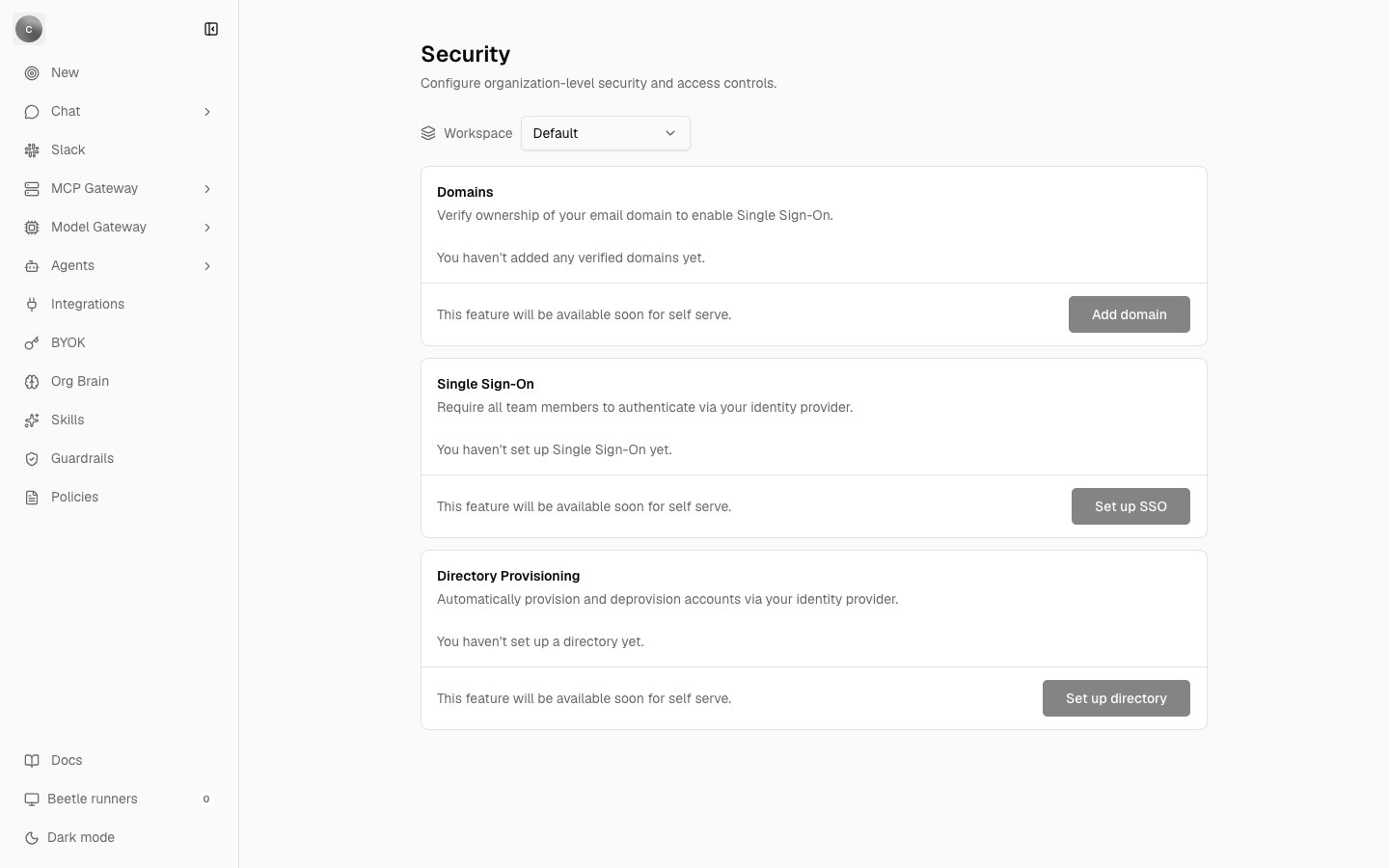
Organization settings → Security. All three cards are placeholders: each one carries the help line 'This feature will be available soon for self serve.' beside a greyed-out button. Notice that Security has no icon in the rail on the left — the page is URL-only.
Each card’s footer reads
This feature will be available soon for self serve. Every button is disabled and every link target is a placeholder. Treat the page as a statement of intent: today, sign-in is email and password, there is no single sign-on or directory sync, and membership is managed one invitation at a time.
Next step: see what Receipt records and how the record resists tampering.