

The Policies page’s Guardrails tab calls this page “fully connected”. That is true of the receipt history and untrue of enforcement; the Policies page sets out the whole quotation.
Where guardrails live
Guardrails are at/organization/settings/guardrails, reachable from the Guardrails entry in the organization settings rail.
The page is owner and admin only, checked in the browser and again on the server — on reads as well as writes — which answers anyone else with “Only organization owners or admins can manage guardrails.” A member who reaches the URL is redirected away rather than shown an access-denied screen, and guardrail configuration is not replicated to a member’s browser at all; access control has the full settings rule and the reason for that exclusion.
The page describes itself as:
Rules that inspect what your agents send and receive — catching secrets, personal data, and prompt injection before they reach a model or leave your organization.with a New guardrails group action, a Search guardrails and groups box, and a Show archived switch.
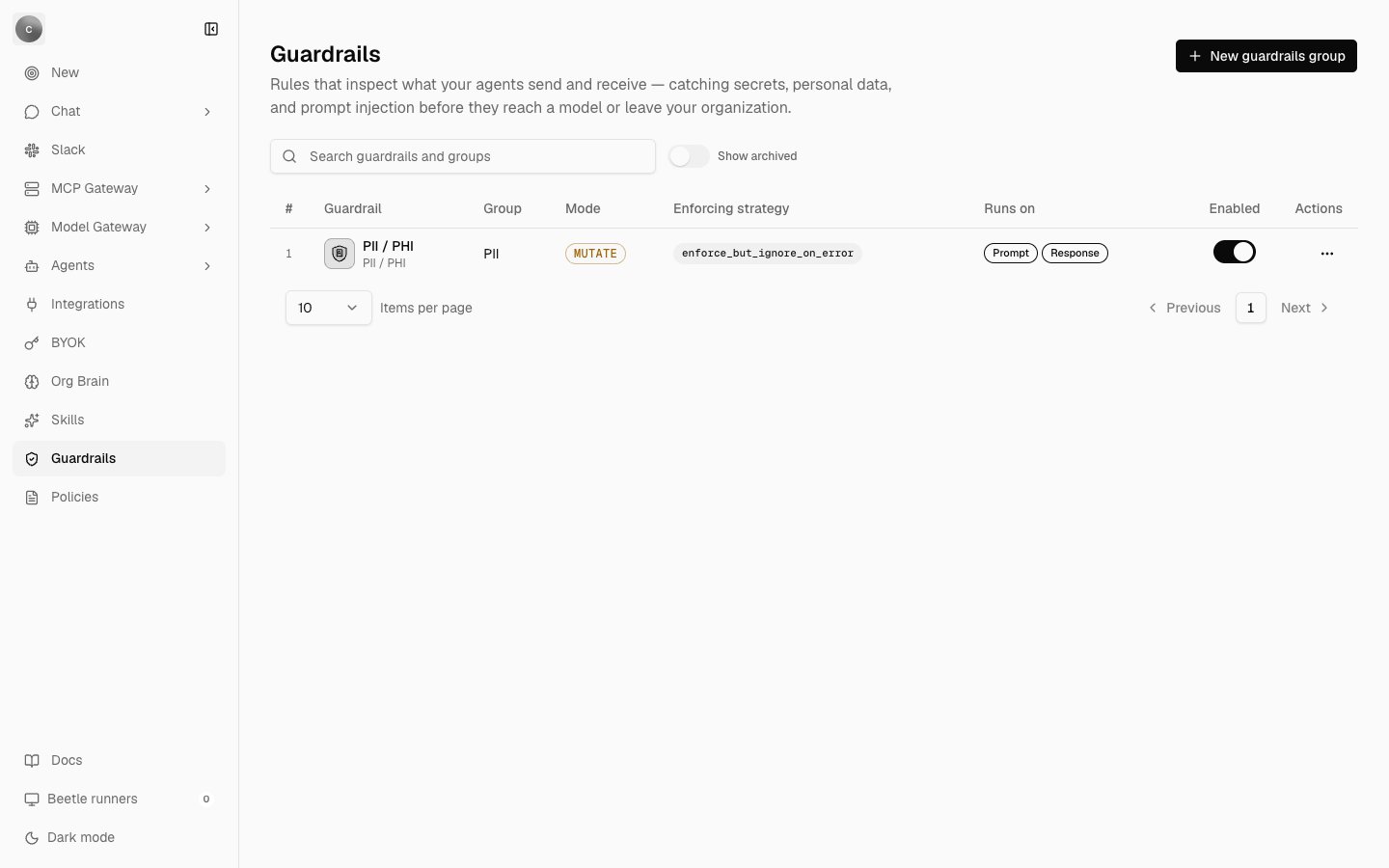
The Guardrails page with one guardrail configured. Notice that a row shows its group, mode, enforcing strategy and stages, and that the switch belongs to the group rather than the row.
Groups and the table
A guardrail belongs to a group. The table lists one row per guardrail, ten to a page until you change the page size, with these columns:
The row menu offers Edit guardrail and Remove guardrail, then, under a group label, Add guardrail, Test group, Edit group and Delete group.
A group summarises itself as
{n} active guardrails · {n} blocking · {n} masking, dropping the counts that are zero, or reads “No active guardrails”. Only enabled guardrails count, and only a validating guardrail that is not on Monitor only counts as blocking.
Creating a group
New guardrails group opens “Add new guardrails group” — “Edit guardrails group” when you reopen it — described as “Guardrails groups hold the rules that inspect your agents’ prompts, responses, and tool traffic.” A Name and at least one guardrail are required; the server rejects an empty group with “Add at least one guardrail to this group.”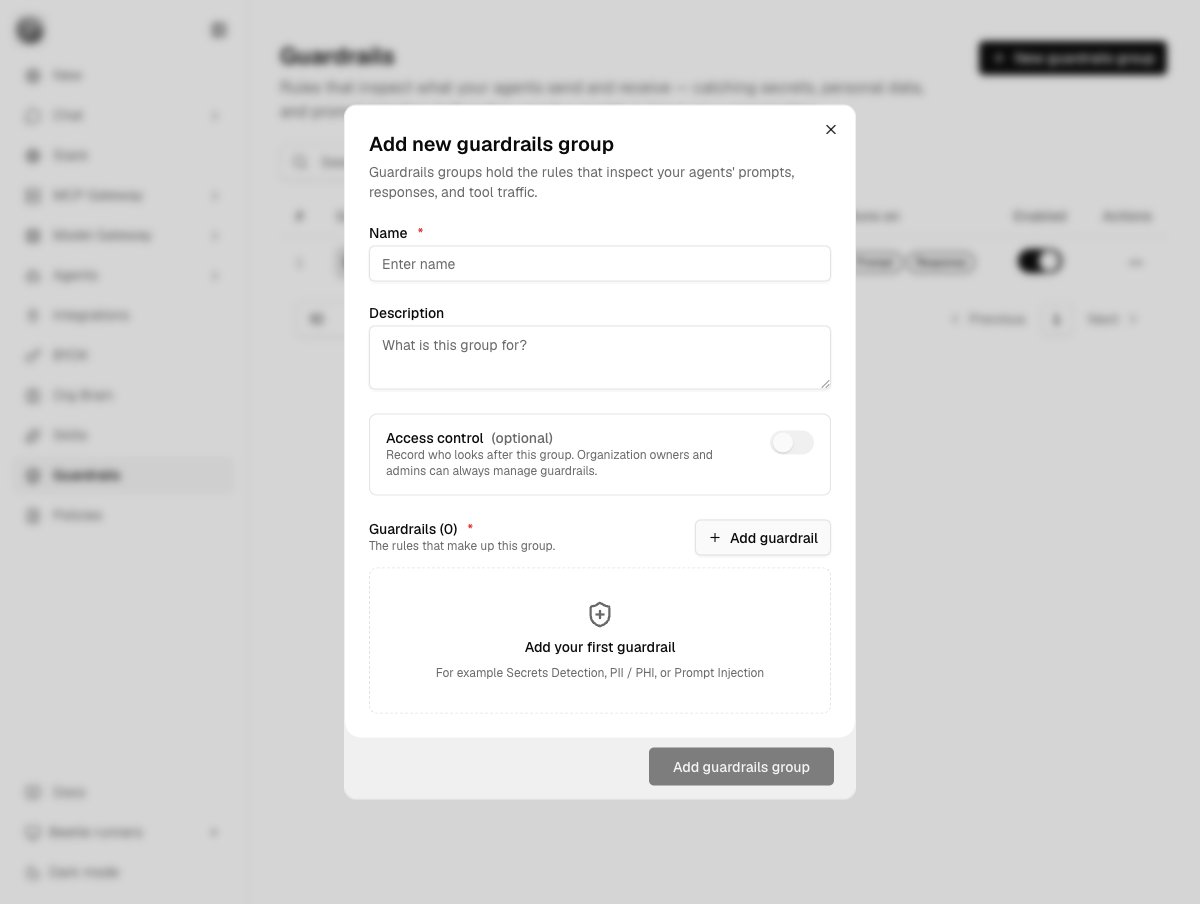
The new-group dialog. Name and at least one guardrail are required, and the empty slot suggests where to start.
Access control (optional) reads “Record who looks after this group. Organization owners and admins can always manage guardrails.” That is exactly what it is — a record. Nothing reads the list for authorization; every guardrail write is checked against owner or admin instead.
The nine guardrail kinds
Add guardrail opens a picker titled “Select a guardrail”, which states the model plainly: “Every guardrail runs inside Receipt. Pick one to configure how it inspects your agents’ traffic.” Each kind ships with a default operation, the operations it supports, the stages it defaults to, and its own configuration fields.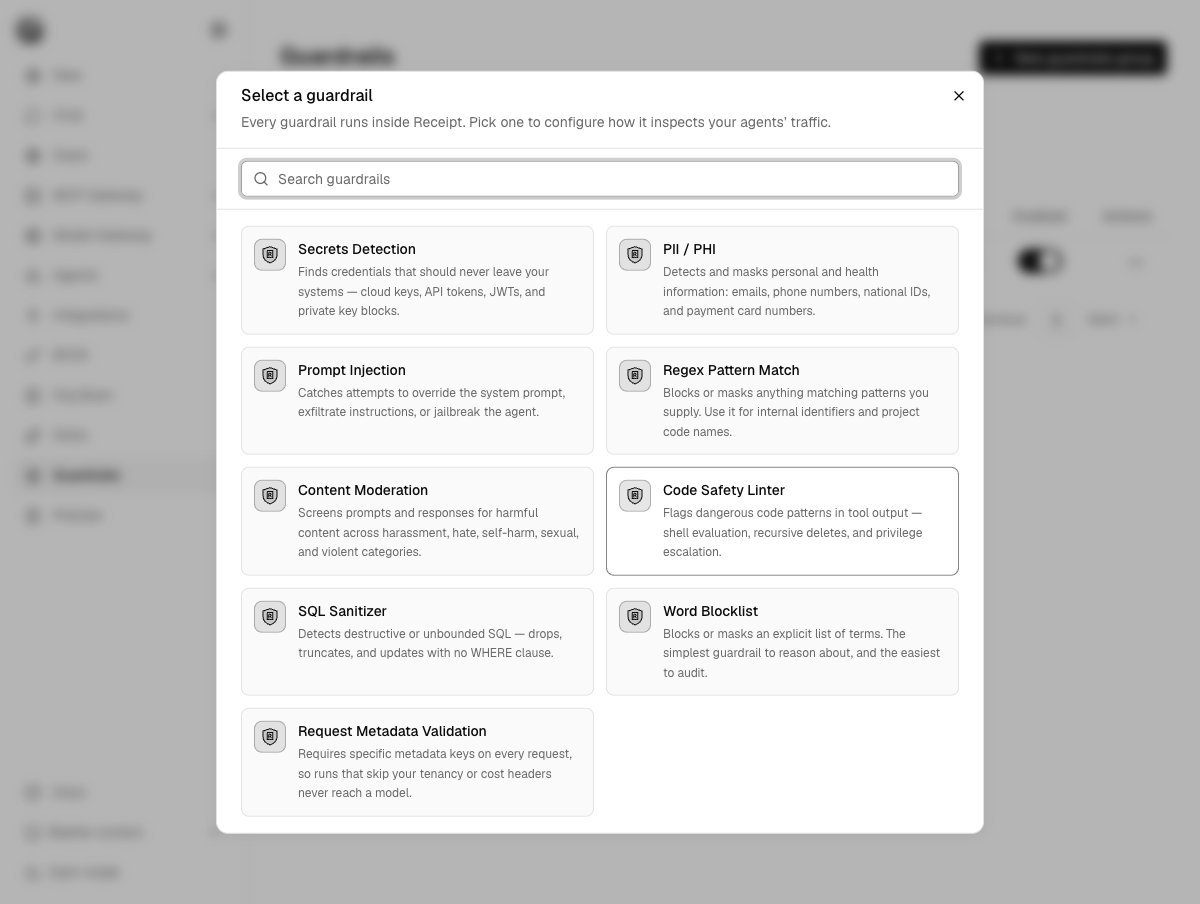
The guardrail picker, showing all nine kinds with the one-line description each one carries into the editor.
Secrets Detection
Secrets Detection
“Finds credentials that should never leave your systems — cloud keys, API tokens, JWTs, and private key blocks.”
- Default operation: Mutate. Supports: Validate, Mutate.
- Default stages: Prompt, Response, Tool traffic.
- Configuration: Minimum severity; Replacement text, defaulting to
[redacted]; Allowed values.
PII / PHI
PII / PHI
“Detects and masks personal and health information: emails, phone numbers, national IDs, and payment card numbers.”
- Default operation: Mutate. Supports: Validate, Mutate.
- Default stages: Prompt, Response.
- Configuration: Categories, defaulting to
email,phone,ssnandcredit_card, withip_addressalso available; Replacement text; Minimum severity.
Prompt Injection
Prompt Injection
“Catches attempts to override the system prompt, exfiltrate instructions, or jailbreak the agent.”
- Default operation: Validate. Supports: Validate only.
- Default stages: Prompt, Tool traffic.
- Configuration: Minimum severity; Also inspect tool results, on by default — though the detector ignores this field, so tool traffic is inspected purely on the strength of the stages you select.
Regex Pattern Match
Regex Pattern Match
“Blocks or masks anything matching patterns you supply. Use it for internal identifiers and project code names.”
- Default operation: Validate. Supports: Validate, Mutate.
- Default stages: Prompt, Response.
- Configuration: Patterns — required — written as JavaScript regular expressions and matched case-insensitively; Replacement text.
Content Moderation
Content Moderation
“Screens prompts and responses for harmful content across harassment, hate, self-harm, sexual, and violent categories.”
- Default operation: Validate. Supports: Validate only.
- Default stages: Prompt, Response.
- Configuration: Categories, defaulting to
harassment,hate,self_harm,sexualandviolence; Minimum severity.
Code Safety Linter
Code Safety Linter
“Flags dangerous code patterns in tool output — shell evaluation, recursive deletes, and privilege escalation.”
- Default operation: Validate. Supports: Validate only.
- Default stages: Tool traffic, Response.
- Configuration: Minimum severity; Allowed commands.
SQL Sanitizer
SQL Sanitizer
“Detects destructive or unbounded SQL — drops, truncates, and updates with no WHERE clause.”
- Default operation: Validate. Supports: Validate only.
- Default stages: Tool traffic.
- Configuration: Block writes with no WHERE clause, on by default; Minimum severity.
Word Blocklist
Word Blocklist
“Blocks or masks an explicit list of terms. The simplest guardrail to reason about, and the easiest to audit.”
- Default operation: Mutate. Supports: Validate, Mutate.
- Default stages: Prompt, Response.
- Configuration: Blocked terms — required; Replacement text.
Request Metadata Validation
Request Metadata Validation
“Requires specific metadata keys on every request, so runs that skip your tenancy or cost headers never reach a model.”
- Default operation: Validate. Supports: Validate only.
- Default stages: Prompt.
- Configuration: Required keys — required.
The vocabulary
Operation: validate or mutate
Validate blocks the run when the guardrail trips. Mutate masks the offending span and lets the run continue — a mutating guardrail never blocks on its own.Enforcing strategy
The enforcing strategy answers a different question: what happens when the guardrail itself fails to run.
Enforce but ignore on error is the default for a new guardrail, in the editor and on the server.
Stage
A guardrail runs on one or more stages: Prompt, Response and Tool traffic.Severity
The severity select offers “Low — flag everything”, “Medium — balanced” and “High — only strong matches”, defaulting to Medium. Its help line states the rule: “Matches below this severity are recorded but never block.”What a block says
A block explanation readsBlocked by guardrail "Name": reason. and never echoes the matched text — the point of the guardrail is to keep that text out of places it does not belong, including the explanation.
If a guardrail is configured but has no detector behind it, evaluation raises No detector is available for '{kindId}'. It is configured but not enforcing., and the enforcing strategy decides whether that stops the run.
What the detectors actually are
Every detector is a fixed pattern set that runs in-process and synchronously. Secrets Detection is nine regular expressions covering cloud keys, provider tokens, JWTs, PEM private-key headers and URLs with inline credentials. PII / PHI matches emails, phone numbers, Social Security numbers, card numbers with a Luhn check, and IPv4 addresses. Prompt Injection is eight phrase and markup patterns with fixed severities. Content Moderation is a short literal term list per category — there is no external moderation service behind it. Code Safety is seven patterns; SQL Sanitizer coversDROP, TRUNCATE TABLE, GRANT ALL and unbounded DELETE/UPDATE.
No detector calls a model, keeps state between calls, or adjusts itself from what it has seen. Tuning a guardrail means editing its allowed values, terms and patterns yourself. Scanning is bounded: a detector reads at most the first 200,000 characters of the text, and keeps at most 200 matches from any one pattern.
Limits
Validation messages you may see while editing:
Enter a name for this group., Enter a name for this guardrail., Names must be 120 characters or fewer., Use at least one letter or number in the name., Enter a pattern., Patterns must be 512 characters or fewer., This is not a valid regular expression.
And from the server: Unknown guardrail type '{kindId}'., {Name} does not support the '{operation}' operation., Choose at least one place for this guardrail to run., {Field} is required for {Name}., Add at least one guardrail to this group., A guardrail group named '{name}' already exists.
Testing a group
Test group in the row menu opens a dialog titledTest {groupName}, which states its own boundary:
Run this group’s guardrails against sample text. Nothing is saved and no live traffic is affected.You choose Inspect as — Prompt, Response or Tool traffic — noting that “Only guardrails configured to run here will be applied”, paste up to 20,000 characters into Sample text, and press Run test. The sample text is pre-filled with
Here is my AWS key AKIAIOSFODNN7EXAMPLE and email me at person@example.com.
The result tells you whether the text was allowed, the text after any mutation, and the violations and errors the run produced. If the group was deleted while the dialog was open, you get This guardrail group no longer exists.
Two details make it an imperfect rehearsal: the test sends empty request metadata, so a Request Metadata Validation guardrail reports every required key as missing; and the test path checks each guardrail’s enabled flag but not the group’s, so a switched-off group still produces results.
Because nothing invokes enforcement in live traffic, this dialog is currently the only place a guardrail actually evaluates anything.
Receipts, ids, and deletion
Every guardrail change is receipt-backed on the streamorganizations/{orgId}/guardrail-groups/{groupId}, through the events organization.guardrail_group.created, .updated, .enabled_changed, organization.guardrail.added, .updated, .removed, organization.guardrail_group.archived and .deleted. Evaluation outcomes are not receipted — there is no violation event, so “Monitor only” has nowhere to record what it would have caught. See receipts and audit for what the receipt chain does cover.
A group’s id is derived deterministically from the organization and the group name, so two admins who create the same group name converge on one stream rather than forking into two.
Removing a guardrail warns that “This guardrail stops inspecting traffic immediately. The change is recorded in the group’s receipt history.” Deleting a group tells you This removes the group and its {n} guardrails. Its receipt history is kept, and the name becomes available again. — deletion drops the projection row and frees the name, and the receipt chain survives.
Show archived has nothing to show unless a group was archived outside the interface. The archive action exists on the server, but nothing in the interface calls it: the row menu ends at Delete group and offers no Archive item.
If the projection table is missing, the page is replaced by a panel titled “Guardrails storage is not set up yet” with the migration commands to run, and a note that “A restart is needed because the replication layer builds its table list at startup.” You will only meet this on a deployment you run yourself.