

The Usage page
Usage lives in organization settings at/organization/settings/usage, titled Usage and described as “Track your plan usage and model requests.” Only owners and admins can open it; a member who reaches the URL is redirected to the app root rather than shown an access-denied screen. Its Usage icon sits below a divider at the bottom of the organization settings rail, directly above Billing, apart from the feature areas above them.
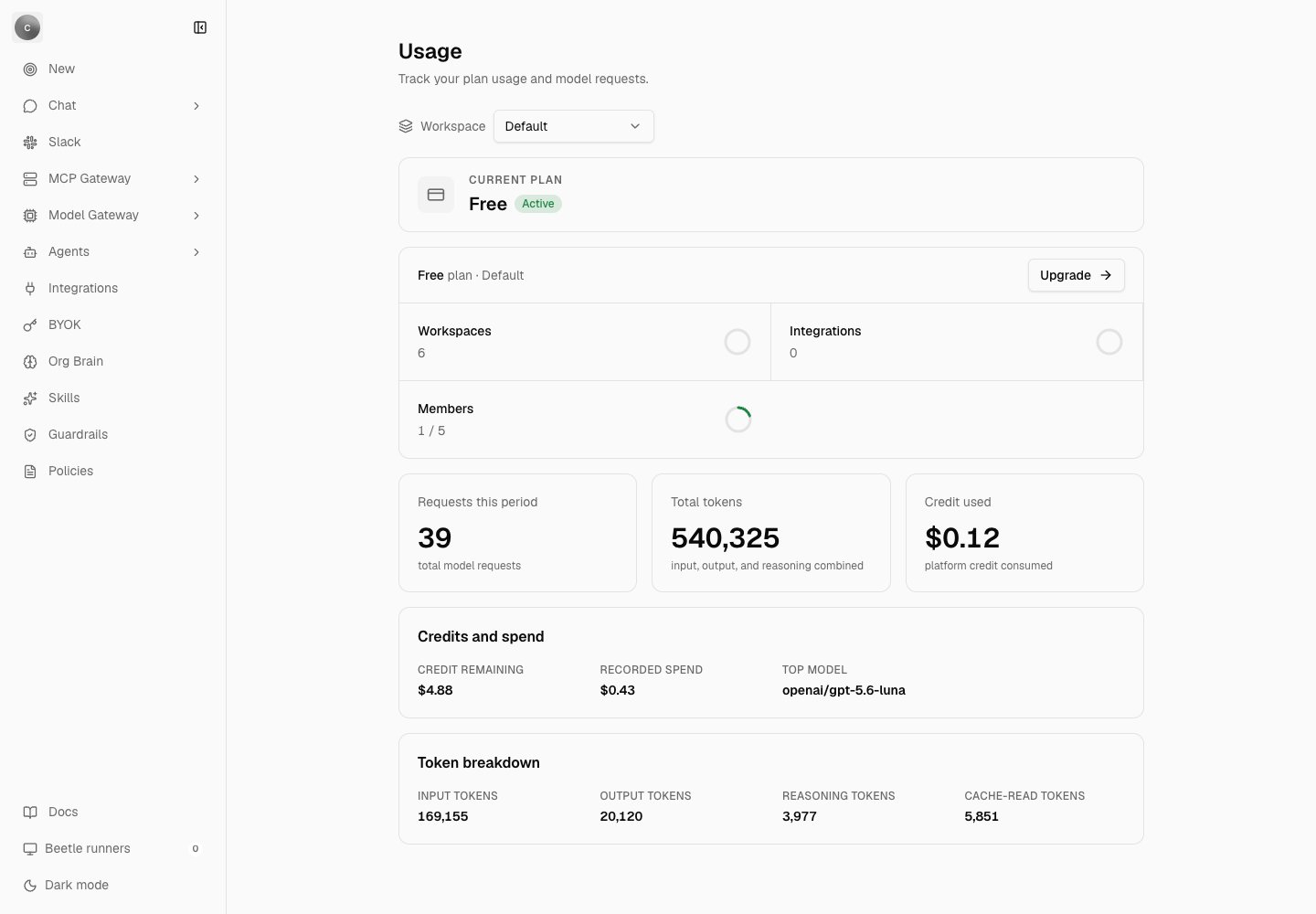
The Usage page on a Free plan. Only the Members tile carries a denominator, so its ring is the only one with any fill — a short green arc for 1 of 5 seats — while the Workspaces and Integrations rings stay empty whatever they count. Recorded spend need not match Credit used: spend sums the cost recorded on every request, including turns that used your own provider key, while Credit used is only what the platform credit balance has given up.
{plan name} plan · {workspace name} (or “no workspace”), with an Upgrade button that links to Billing.
The three resource tiles
Members is the only tile with a real cap, because seats are the only per-plan limit enforced today. On the Free plan that ceiling is five seats by default; a deployment can change it with
RECEIPT_DEFAULT_FREE_SEAT_COUNT. Inviting past it is refused, not just flagged on this page.
The headline cards and the detail rows
Three headline cards:- Requests this period — captioned “total model requests”.
- Total tokens — captioned “input, output, and reasoning combined”.
- Credit used — the granted credit minus what remains, captioned “platform credit consumed”.
The two number formats behave differently when a value is missing. A missing value renders as
Not recorded in the stat rows, but as 0 in the three headline cards. A headline 0 therefore does not distinguish “nothing happened” from “nothing was recorded”.How a turn is paid for
The signup credit. Each new hosted organization is granted a one-time $5 platform credit, written to its billing account as asignup_grant ledger entry attributed to the organization owner. Self-hosted organizations are granted nothing, and the whole usage policy is disabled on self-hosted deployments.
The reservation. Unless the turn resolves one of your own provider keys, the request reserves an estimate before the model runs. The estimate prices your prompt tokens at the model’s input rate, adds an output allowance of at least 96 tokens (12% of the prompt, capped by the model’s default maximum output) at the output rate, adds 10% headroom, and never reserves less than $0.005. A model with no pricing in the catalog reserves that floor. Stale reservations expire after 15 minutes. The whole check runs in one transaction with a row lock, so two concurrent turns cannot spend the same balance twice.
Settlement. When the stream finishes, Receipt settles the reservation to the real number: a provider-reported cost if one came back, otherwise the catalog rate card applied to the recorded tokens, otherwise the estimate, otherwise zero — deliberately, so a missing provider cost never turns a completed platform-funded request into a free one. The difference is refunded or captured, and any overage the balance cannot cover is forgiven. A monetization row moves from pending to settled, or is recorded as bypassed when the turn used your own key or reserved nothing.
If the turn never completes, the reservation is released with a reason — request_failed, title_generation_failed or reservation_expired.
Turns that use your own provider key bypass the reservation entirely: you are paying the provider directly, so Receipt has no balance to hold. That also means this traffic is not constrained by your credit or your seat budget. See Bring your own key.
Seat budgets and organization caps
A Free organization has no plan budget; its turns run against the platform credit balance instead. Paid organizations get a per-seat bucket for the billing cycle, prorated by the time left in that cycle. The seat’s monthly budget is the plan’s seat price reduced by a target margin, which the deployment sets withWORKSPACE_USAGE_TARGET_MARGIN_PERCENT (with optional per-plan overrides such as WORKSPACE_USAGE_PRO_TARGET_MARGIN_PERCENT). The variable is required on a hosted deployment for paid plans: the resolver throws Missing {NAME} when it is absent, and Expected {NAME} to be between 0 and 100 when the value is out of range.
A hosted organization may also carry an organization-wide monthly cap. Only Kentron can set it — organization settings has no control for it — and when one is present it replaces the derived figure and is divided evenly across the seat count.
Seats themselves are picked per member per cycle, preferring genuinely unused seats over ones a previous member has already spent from, so inviting and removing members cannot manufacture extra budget.
There is no token budget anywhere in the product. The only token ceilings on a request are the per-call output cap and the context-window check; spend limits are all denominated in dollars.
What a refusal looks like
Spend refusals are returned before the model call, as HTTP 429 with a retryable error envelope.The credit message points at a page called “Billing & Credits”. No page ships under that name — the destination is Billing, described on Billing and plans. The envelope these refusals are returned in is on Gateway configuration, and every user-visible chat message is quoted on Errors and limits.
The request rate limit
Chat is limited to 30 requests per 60-second window, per user. It is a fixed-window counter in Postgres, keyed on the user and the window start; there is no per-organization limit, no per-key limit, and noRetry-After header — the wait hint travels inside the error envelope as retryAfterSeconds. The window and the maximum are deployment variables, listed on Gateway configuration.
What is recorded for each request
A usage row and a monetization row
A usage row and a monetization row
One of each per request id, carrying the user, the organization, the seat, the model id, whether your own key was used, the estimated and actual nano-USD, and a token-metadata payload. These rows are what the Usage page reads.
One structured request log line
One structured request log line
A single wide event per request with the actor, the thread, the requested and resolved model, reasoning effort, the policy that applied (including the zero-data-retention requirement and any denied tool keys), stream details, prompt and total tokens, estimated and actual cost, and the outcome. It contains no prompt or completion text.
Receipts, for direct answers
Receipts, for direct answers
A direct answer appends a
response.finalized receipt carrying the same analytics, followed by a run.status receipt of completed with the note chat turn completed from /api/chat. Background work in Factory writes its own objective receipts. Router sub-calls are folded into the turn rather than itemized. See Receipts and streams.Who can see a cost figure
Per-turn cost is exposed to the person who ran it when either the turn used your own provider key, or the deployment setsALLOW_USER_COST_DISPLAY=true (the example environment file ships false). Otherwise the figure is kept internal, and only the aggregate on the Usage page is visible.
Where cost is exposed, the composer’s context hover card shows a Total cost footer, and the replay dialog labels the row Estimated provider cost, showing Not recorded when no figure was captured — a missing cost is deliberately kept distinct from a zero cost.
Next step: set the gateway’s configuration variables.