

Where the controls live
Two routes share one underlying policy record:/organization/settings/provider-policy— “Provider policy”, “Configure provider and model restrictions and compliance flags for your organization.” It renders three sections: compliance flags, provider controls, and model controls./organization/settings/compliance-policy— “Compliance & Policy”, “Configure organization-level AI rules and access policies.” It renders only the compliance flags — the same section as above, nothing more.
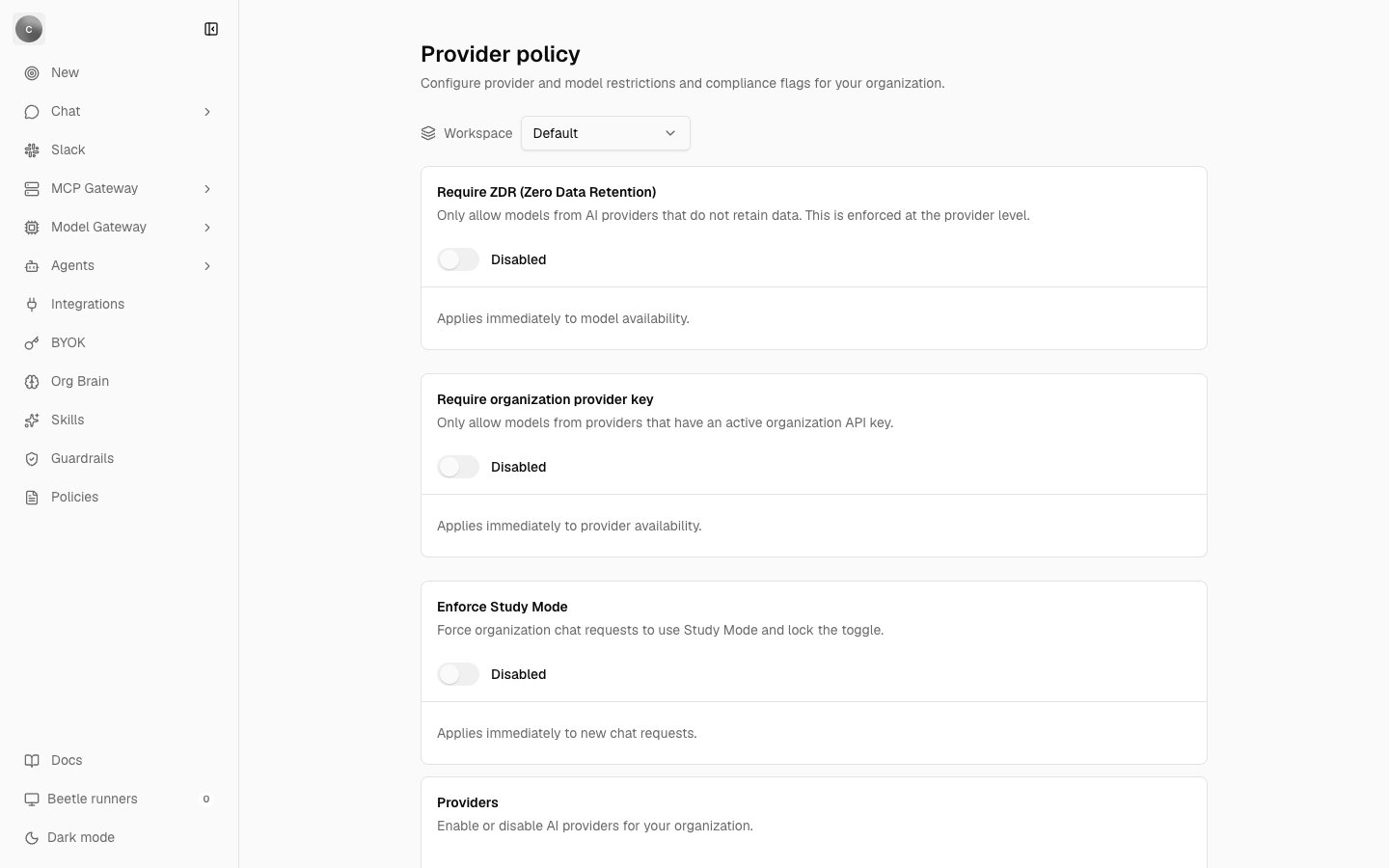
Provider policy. The three compliance-flag cards sit above the Providers section; each card carries its description, its switch — reading Disabled here — and its help line. The workspace indicator at the top names the workspace you are in; the policy record itself is organization-wide.
Compliance flags
Require ZDR
This flag does two things. It restricts model selection to catalog models marked zero-data-retention, denying anything else. The catalog entry’s own flag is the whole test — there is no runtime check against the provider. And it gates one tool: Anthropic code execution is dropped from a request, with the reasonblocked_by_compliance, when the organization requires ZDR and holds no active organization provider key for that provider.
Both checks share the same bypass. Before the compliance test runs, the engine asks whether the organization’s stored provider-key snapshot marks an executable provider — OpenAI or Anthropic — among the model’s routes. If it does, the model skips the ZDR test entirely. That is exactly what the BYOK confirmation dialog warns you about when you save a key while ZDR is on. The snapshot is organization-global, so a key saved on a single workspace does not create the bypass.
Scope this flag precisely when you describe it to anyone. It restricts which models can be selected and it gates one tool. It is not an end-to-end no-retention guarantee, and it does not suppress application error telemetry: the flag is recorded into the telemetry payload but is never consulted to decide whether to send one. See Data handling and security for what does and does not leave the deployment.
Enforce Study Mode
An organization-enforced mode wins over both the request’s mode and the thread’s mode. Study Mode pins the model toopenai/gpt-oss-120b, injects its own study-assistant system prompt, and empties the provider-native tool allowlists for openai, anthropic, google and xai. Without the flag, Study Mode is a per-thread choice: a Study Mode checkbox in the composer’s + menu, whose tooltip reads “Enable Study Mode”. With the flag on, that checkbox becomes disabled and its tooltip changes to “Study Mode is enforced by your organization”.
The enforcement works. The pinned model is the problem — see the callout at the top of this page.
Provider and model controls
Providers (“Enable or disable AI providers for your organization.”, help “Changes apply immediately. Disabled providers and their models are unavailable to the organization.”) gives you one toggle per model-catalog manufacturer. There are eleven — OpenAI, Anthropic, Google, Alibaba, DeepSeek, Meta, Mistral, MiniMax, Moonshot, xAI and Z.AI — not the 32 tiles in the provider gallery, which are a different thing entirely. Each row carries a “View all models” link through to that manufacturer’s model list. Model Controls (“Override model availability per model. Disabled by provider or compliance policy is shown in the description.”, help “Changes apply immediately. You can override a provider-level denial per model here.”) lets you act on a single model. A row that is already denied describes itself as{modelId} · Disabled by: {sources}.
Strict mode: CHAT_REQUIRE_BYOK
The one hard “a provider key is required” gate is not on either of these screens. It is the environment variable CHAT_REQUIRE_BYOK, which ships as false; with it on, a request that would otherwise fall back to platform credit is refused instead, with three denial reasons that cannot otherwise occur. Bring your own key lists those reasons, and Gateway configuration covers the variable and the rest of the gateway’s settings.
What a denial looks like
Every model-policy denial returns HTTP 403 and is not retryable. The reasons below share one translated message — “The selected AI model is not allowed for your organization.” — so the machine-readable reason attached to the failure is what tells you which rule fired. When several apply, they are joined into one reason, as inpolicy_denied:provider,model.
Strict mode adds three more reasons, and the one containing
missing_provider_api_key is shown as “This provider requires an organization API key, but no key is configured.” instead. Gateway configuration has the complete reason table and the envelope a denial returns.
For the full set of chat error strings and what to do about each, see Errors and limits.
How the policy is stored, and what it covers
One row per organization holds the disabled provider ids, the disabled model ids, the compliance flags, the tool switches, the provider-key snapshot and the enforced mode. It is overwritten on each update — no prior version is kept, and it is not a receipt stream, so a policy change leaves no audit history beyond its timestamp, and a denial writes no receipt either. If you need a record of who changed what, this is not where you will find it; see Receipts and audit for what is recorded. Two write paths reach that row. The settings UI uses sync mutators whose server pass re-reads your membership row in the database — not the role cached in the browser — and refuses anyone who is not an owner or admin with “Only workspace owners or admins can manage organization settings.” The other is the organization-scopedPOST /api/org/model-policy, which accepts seven actions: toggle_provider, toggle_model, toggle_compliance_flag, set_enforced_mode, toggle_provider_native_tools, toggle_external_tools and toggle_tool. On either path an id that is not in the catalog is rejected with Unknown provider id: {id}, Unknown model id: {id}, Unknown tool key: {key} or Unknown mode id: {id}. The plan-based feature gates named on these screens always resolve to allowed, so no plan blocks you from setting policy.
The deny lists and flags are evaluated when a chat turn — and the background title generation that follows it — resolves its model. Background Factory runs resolve their own model and funding on a separate, OpenAI-only path and are not filtered by these lists.
Next step: see what those model calls cost.