> ## Documentation Index
> Fetch the complete documentation index at: https://docs.kentron.ai/llms.txt
> Use this file to discover all available pages before exploring further.
# What the LLM Gateway does
> One server-side checkpoint applies your organization's model policy and picks the credential before Receipt contacts any provider.
The LLM Gateway is where your organization decides which model providers it uses, which credential pays for each call, and which models are off limits. Every model call Receipt itself makes — a chat answer, a generated thread title, an attachment embedding, a background run — resolves its model and its credential on the server before a provider is contacted. There is no external endpoint for other applications to route their own traffic through.
Both decisions live in two containers. Your **organization** holds your members, your plan and your billing. A **[workspace](/mcp-gateway/workspaces)** sits inside it — a workspace is the boundary that holds a set of connected accounts and the permissions on them. Model policy is set once for the organization; a Models account belongs to a workspace, and a provider key can be saved at either scope.
New to Kentron? Start with [What Kentron is](/introduction).
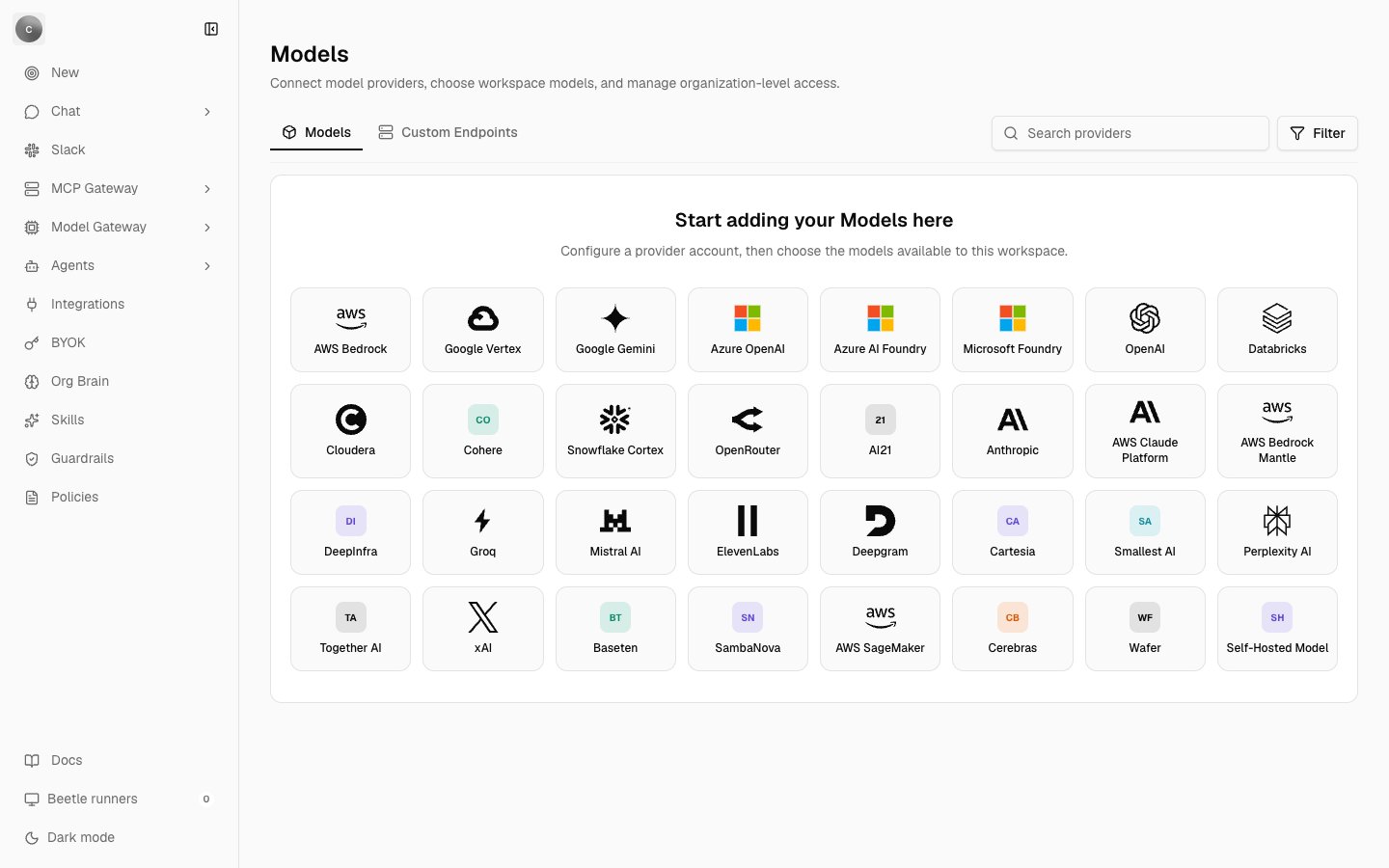
**Only two of the 32 model providers on the app's Models page can run a request, and the Playground is an empty heading.** Each provider is one tile in that gallery, the thing you connect an account to. OpenAI and Anthropic are the only providers with a runtime adapter in this release. The other 30 tiles open, but their fields are disabled and the wizard never advances past its first step; a save sent directly to the server is refused with **"This provider is a catalog preview and cannot be configured yet."** The **Playground** item in the sidebar's **Model Gateway** area renders a page containing the heading **"Playground"** and nothing else — no model selector, no request, no usage, no receipt.
The provider gallery, the setup wizard, workspace Models accounts, and the model catalog.
Organization and workspace provider keys, how they are stored, and which requests they cover.
Provider and model deny lists, the three compliance flags, and what a denial returns.
Platform credit, pre-authorized budgets, the per-user request limit, and the Usage page.
The variables on the model path, the error envelope, and self-hosted differences.
## What runs today
| Provider | Credential it accepts | Where it works |
| ------------- | ----------------------------------------------------------------------------- | ----------------------------------------------------------------------------------------------------- |
| **OpenAI** | The platform-funded server key, or your organization's or workspace's own key | Chat answers, thread titles, embeddings, and background runs |
| **Anthropic** | Your own key only — there is no platform-funded Anthropic route | Chat answers, and the thread title generated from one; embeddings and background runs are OpenAI-only |
The model catalog held 75 rows from eleven model manufacturers — the company that built the model, such as OpenAI, Google or Mistral — when this page was written, and only the 25 that route through OpenAI or Anthropic execute. The rest still appear in the policy screens, but a turn that selects one cannot be routed and fails with **"The AI provider is currently unavailable. Please retry."** (HTTP 502). [Models and providers](/llm-gateway/models-and-providers) has the catalog itself: the manufacturers, the fields on a row, and why the app rather than this page is the list to trust.
The chat composer has no model picker in this release. Which model a turn uses is resolved on the server from the thread's model and your organization's policy, not chosen per message. A new thread defaults to `openai/gpt-5.6-luna`, so in practice that is the model a turn runs on unless the thread was created with another id. The one composer control that changes it is **Study Mode**, and the model it pins cannot execute — see [Model policy](/llm-gateway/model-policy).
 ## How a request flows
```mermaid theme={null}
flowchart TB
Req[Chat turn, or the thread title
## How a request flows
```mermaid theme={null}
flowchart TB
Req[Chat turn, or the thread title
generated from one]
Policy{Model policy
provider deny list, model deny list, ZDR}
Cred[Credential resolution
workspace Models account, then your key,
then the platform OpenAI key]
Budget{Spend reservation
platform credit and seat budget}
Provider[(OpenAI or Anthropic)]
Records[Usage row, request log, receipt]
Stop[Request refused]
Req --> Policy
Policy -- denied, HTTP 403 --> Stop
Policy -- allowed --> Cred
Cred --> Budget
Budget -- exhausted, HTTP 429 --> Stop
Budget -- reserved --> Provider
Provider --> Records
```
Three gates, one provider call, one ledger:
1. **Policy.** Your organization's disabled providers, disabled models and Zero Data Retention requirement — allow only models the catalog marks as not retaining data — are evaluated first. A denial is HTTP 403, and it happens before any spend is reserved and before a provider is contacted. See [Model policy](/llm-gateway/model-policy).
2. **Credential.** A workspace **Models account** — a provider account saved in the app, holding one encrypted key and the list of models it may run — wins when one covers the model and you are allowed to use it; otherwise your organization's or workspace's own provider key; otherwise the platform-funded OpenAI key. A request that runs on your own key skips the reservation step entirely. [Bring your own key](/llm-gateway/bring-your-own-key) gives the exact order.
3. **Spend.** Platform-funded and paid-seat turns reserve an estimate against the balance *before* the model runs, then settle to the real cost once the answer finishes. An exhausted balance is HTTP 429. See [Usage and spend](/llm-gateway/usage-and-spend).
4. **Provider.** The answer streams back through the same layer, which sets the output cap and the provider options.
5. **Records.** Every turn that reaches the provider writes a usage row (tokens, model, cost, and whether your own key paid) and one structured request log line carrying the model, the policy outcome, tokens and cost — never the prompt or the completion. A direct chat answer also writes a `response.finalized` receipt carrying the same analytics, and [Replay](/co-worker/replay) reads that stream back.
Two other model calls take a shorter version of that path. Attachment embeddings always run `openai/text-embedding-3-small`, on your organization's OpenAI key or on the platform key when there is none; they reserve and settle spend and write a usage row like any other call, but the provider and model deny lists are not evaluated for them. Background runs are OpenAI-only because Factory ships only an OpenAI adapter, and a platform-funded run has to present the credit reservation its chat turn already made before Receipt hands it the server key.
For the exact message a user sees at each gate, see [Errors and limits](/co-worker/errors-and-limits).
## A checkpoint, not a proxy
Every model call Receipt itself makes is resolved and funded on the server. Nothing else can reach that path: there is no OpenAI-compatible endpoint, no `/v1/*` route and no proxy anywhere in the product, so you cannot point another application's SDK at Receipt and have it inherit your policy.
The **Custom Endpoints** tab on the Models page points the other way. It offers to "Add an OpenAI-compatible or self-hosted inference endpoint and then select the models it exposes" — that is Receipt calling your endpoint as a provider, not your application calling Receipt. Its **Add custom endpoint** button opens the Self-Hosted Model tile, which is one of the 30 catalog previews and cannot be saved yet.
## Where it lives in the app
The sidebar area is titled **Model Gateway**, described as "Manage models and try them in the playground", and holds two items: **Models** and **Playground**. **Models** has no page of its own — it opens `/organization/settings/models`, the provider gallery in organization settings, which is owner and admin only. A member who reaches that URL is returned to the app root with no access-denied screen. `/model-gateway` itself has no index page and renders an empty column.
Next step: [connect a provider and choose its models](/llm-gateway/models-and-providers).