> ## Documentation Index
> Fetch the complete documentation index at: https://docs.kentron.ai/llms.txt
> Use this file to discover all available pages before exploring further.
# Bring your own key
> Store your organization's own provider API key, save it in the scope Receipt actually reads, and know which credential pays for each request.
Bringing your own key means model calls run on your provider account instead of on platform credit — the balance Receipt funds a turn from when you have no key of your own, described in [Usage and spend](/llm-gateway/usage-and-spend). You paste an OpenAI API key into Receipt, it is validated against the provider and encrypted before it is stored, and from then on matching requests execute against your key — with your rate limits, your billing and no spend reservation against your Receipt credit.
There are two places to save one, and they are not the same key: the organization **BYOK** page, and a workspace's **LLM keys** tab. Which one Receipt reads depends on the request, so pick the scope deliberately — that section is below, and it is the part of this page most likely to surprise you.
## Save a key on the BYOK page
The BYOK page is at `/organization/settings/byok`, reachable from the **BYOK** item in the organization settings rail. It is titled **"BYOK"** and describes itself as **"Optional: use your organization's encrypted provider keys instead of platform credit (Bring Your Own Key)."** That word *optional* is accurate: without a key, requests run on platform credit. With one, matching requests execute against your key instead.
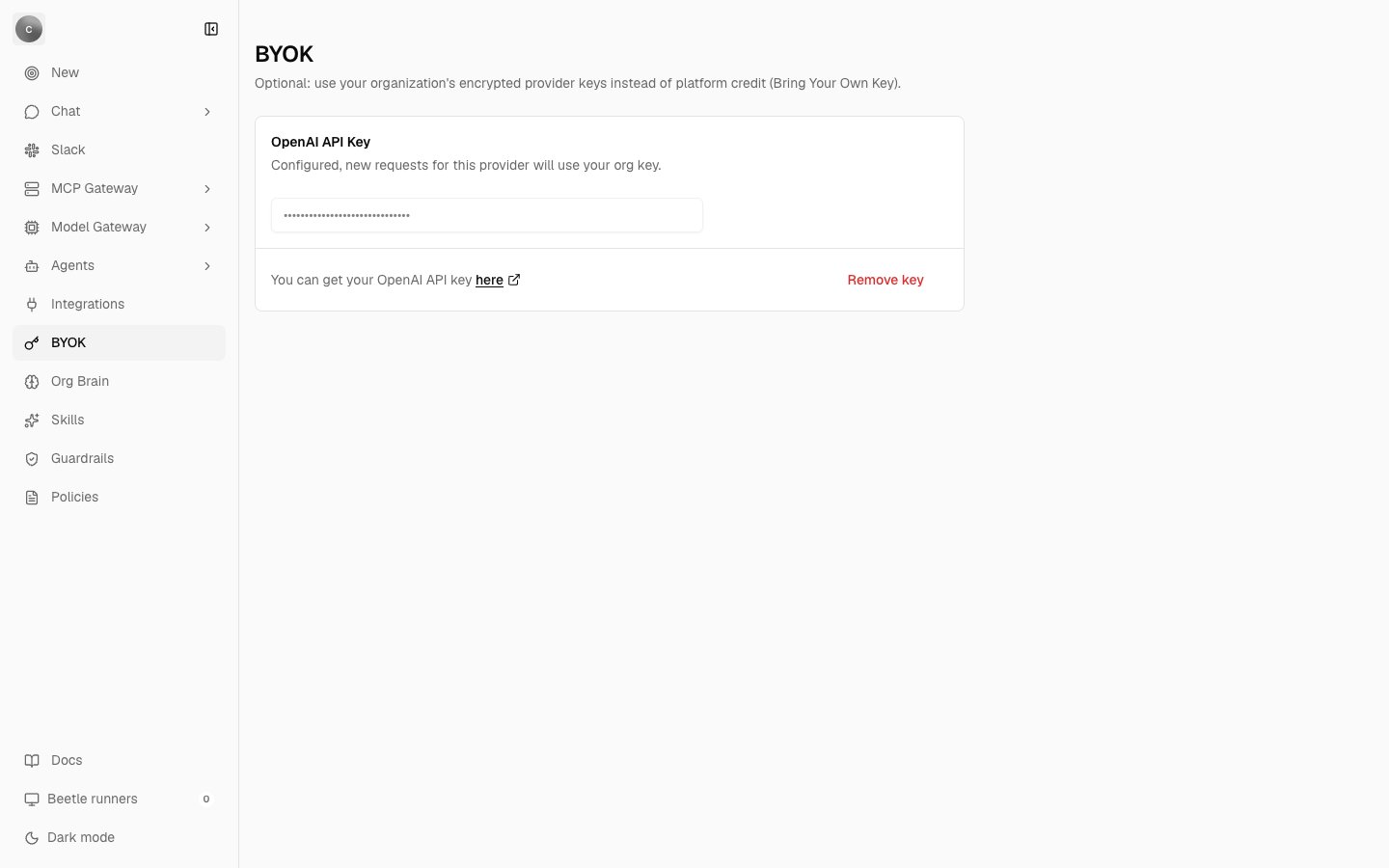 There is one card per provider, titled **"{Provider} API Key"**. Its description tells you the current state:
* Configured — **"Configured, new requests for this provider will use your org key."**
* Not configured — **"Not configured, requests will continue using Receipt defaults."**
Below the field is the line **"You can get your {providerName} API key"** followed by a **here** link pointing at that provider's own key console. The button reads **"Save key"** when nothing is stored and **"Remove key"**, styled as a destructive action, when a key exists. A configured key renders as a row of masked dots and the input stays disabled until you remove the key — you replace a key by removing it and saving a new one, not by typing over it.
Saving and removing confirm with **"Provider key saved successfully."** and **"Provider key removed successfully."** If the organization scope cannot be resolved at all, the page shows **"Organization API keys could not be loaded. Refresh and try again."** instead of the form.
Like the rest of organization settings, the page is owner- and admin-only. The save path does not trust the route guard: it independently re-checks that you hold mutation authority over the target workspace, which means workspace owner or admin, or, failing that, organization owner or admin. A write without a workspace at all is refused with **"A workspace is required to manage provider keys."**
## Which providers appear
The runtime supports two providers for BYOK — **OpenAI** and **Anthropic** — and both are executable in chat.
The page, at this release, renders **OpenAI only**. Anthropic is on a hidden list that the page's provider ordering filters out. That hiding is a presentation decision and nothing more: a key already stored for Anthropic stays encrypted in the database, and the gateway keeps honouring it at request time. So if your organization saved an Anthropic key before it was hidden, it is still in force even though the page no longer shows it.
[Background runs](/co-worker/background-runs) — the durable objectives Receipt queues instead of answering you directly — are OpenAI-only. Factory, the engine that runs them, looks up provider `openai` and calls the OpenAI SDK, so an Anthropic key is honoured for direct chat answers but never for a background objective. See [Models and providers](/llm-gateway/models-and-providers) for what else is catalog preview rather than a working route.
## Validation happens before storage
Two layers run when you save, and both must pass.
**Layer 1 — format.** A local check on the shape of the string:
| Condition | Message |
| ------------------------------------ | ----------------------------------------------- |
| Empty value | `Provider API key is required.` |
| OpenAI key not starting `sk-` | `OpenAI API keys must start with "sk-".` |
| Anthropic key not starting `sk-ant-` | `Anthropic API keys must start with "sk-ant-".` |
Any other provider gets only the non-empty check.
**Layer 2 — a live call to the provider.** Receipt makes one bounded, non-mutating request with the key you supplied: `GET https://api.openai.com/v1/models` with a bearer token for OpenAI, or `GET https://api.anthropic.com/v1/models?limit=1` with an `x-api-key` header and `anthropic-version: 2023-06-01` for Anthropic. The request is capped at 10 000 ms, and the response body is deliberately ignored — only the status matters.
| Outcome | Message | Retryable |
| -------------------------- | -------------------------------------------------------------------------------------------- | --------- |
| `401` or `403` | `Unable to connect to {provider}. Verify that your {provider} API key is valid.` | No |
| Any other non-OK status | `{provider} could not validate this API key right now. Try again shortly.` | Yes |
| Network failure or timeout | `{provider} could not validate this API key right now. Check your connection and try again.` | Yes |
The order matters more than the messages do: **validation runs before encryption and persistence.** A revoked, mistyped or wrong-provider key never becomes durable state, so a failed save leaves whatever was there before untouched.
## Where a key lives: organization or workspace
Keys are stored per organization, per workspace and per provider, and the two surfaces write to different workspaces.
The organization BYOK page deliberately writes into a hidden organization-wide scope rather than into whichever workspace you happen to have open: it resolves an organization-scope workspace id and passes that explicitly. The **LLM keys** tab on a workspace's MCP Gateway overview embeds the same card but binds it to that workspace, so a key saved there is stored against that named workspace only.
There is one card per provider, titled **"{Provider} API Key"**. Its description tells you the current state:
* Configured — **"Configured, new requests for this provider will use your org key."**
* Not configured — **"Not configured, requests will continue using Receipt defaults."**
Below the field is the line **"You can get your {providerName} API key"** followed by a **here** link pointing at that provider's own key console. The button reads **"Save key"** when nothing is stored and **"Remove key"**, styled as a destructive action, when a key exists. A configured key renders as a row of masked dots and the input stays disabled until you remove the key — you replace a key by removing it and saving a new one, not by typing over it.
Saving and removing confirm with **"Provider key saved successfully."** and **"Provider key removed successfully."** If the organization scope cannot be resolved at all, the page shows **"Organization API keys could not be loaded. Refresh and try again."** instead of the form.
Like the rest of organization settings, the page is owner- and admin-only. The save path does not trust the route guard: it independently re-checks that you hold mutation authority over the target workspace, which means workspace owner or admin, or, failing that, organization owner or admin. A write without a workspace at all is refused with **"A workspace is required to manage provider keys."**
## Which providers appear
The runtime supports two providers for BYOK — **OpenAI** and **Anthropic** — and both are executable in chat.
The page, at this release, renders **OpenAI only**. Anthropic is on a hidden list that the page's provider ordering filters out. That hiding is a presentation decision and nothing more: a key already stored for Anthropic stays encrypted in the database, and the gateway keeps honouring it at request time. So if your organization saved an Anthropic key before it was hidden, it is still in force even though the page no longer shows it.
[Background runs](/co-worker/background-runs) — the durable objectives Receipt queues instead of answering you directly — are OpenAI-only. Factory, the engine that runs them, looks up provider `openai` and calls the OpenAI SDK, so an Anthropic key is honoured for direct chat answers but never for a background objective. See [Models and providers](/llm-gateway/models-and-providers) for what else is catalog preview rather than a working route.
## Validation happens before storage
Two layers run when you save, and both must pass.
**Layer 1 — format.** A local check on the shape of the string:
| Condition | Message |
| ------------------------------------ | ----------------------------------------------- |
| Empty value | `Provider API key is required.` |
| OpenAI key not starting `sk-` | `OpenAI API keys must start with "sk-".` |
| Anthropic key not starting `sk-ant-` | `Anthropic API keys must start with "sk-ant-".` |
Any other provider gets only the non-empty check.
**Layer 2 — a live call to the provider.** Receipt makes one bounded, non-mutating request with the key you supplied: `GET https://api.openai.com/v1/models` with a bearer token for OpenAI, or `GET https://api.anthropic.com/v1/models?limit=1` with an `x-api-key` header and `anthropic-version: 2023-06-01` for Anthropic. The request is capped at 10 000 ms, and the response body is deliberately ignored — only the status matters.
| Outcome | Message | Retryable |
| -------------------------- | -------------------------------------------------------------------------------------------- | --------- |
| `401` or `403` | `Unable to connect to {provider}. Verify that your {provider} API key is valid.` | No |
| Any other non-OK status | `{provider} could not validate this API key right now. Try again shortly.` | Yes |
| Network failure or timeout | `{provider} could not validate this API key right now. Check your connection and try again.` | Yes |
The order matters more than the messages do: **validation runs before encryption and persistence.** A revoked, mistyped or wrong-provider key never becomes durable state, so a failed save leaves whatever was there before untouched.
## Where a key lives: organization or workspace
Keys are stored per organization, per workspace and per provider, and the two surfaces write to different workspaces.
The organization BYOK page deliberately writes into a hidden organization-wide scope rather than into whichever workspace you happen to have open: it resolves an organization-scope workspace id and passes that explicitly. The **LLM keys** tab on a workspace's MCP Gateway overview embeds the same card but binds it to that workspace, so a key saved there is stored against that named workspace only.
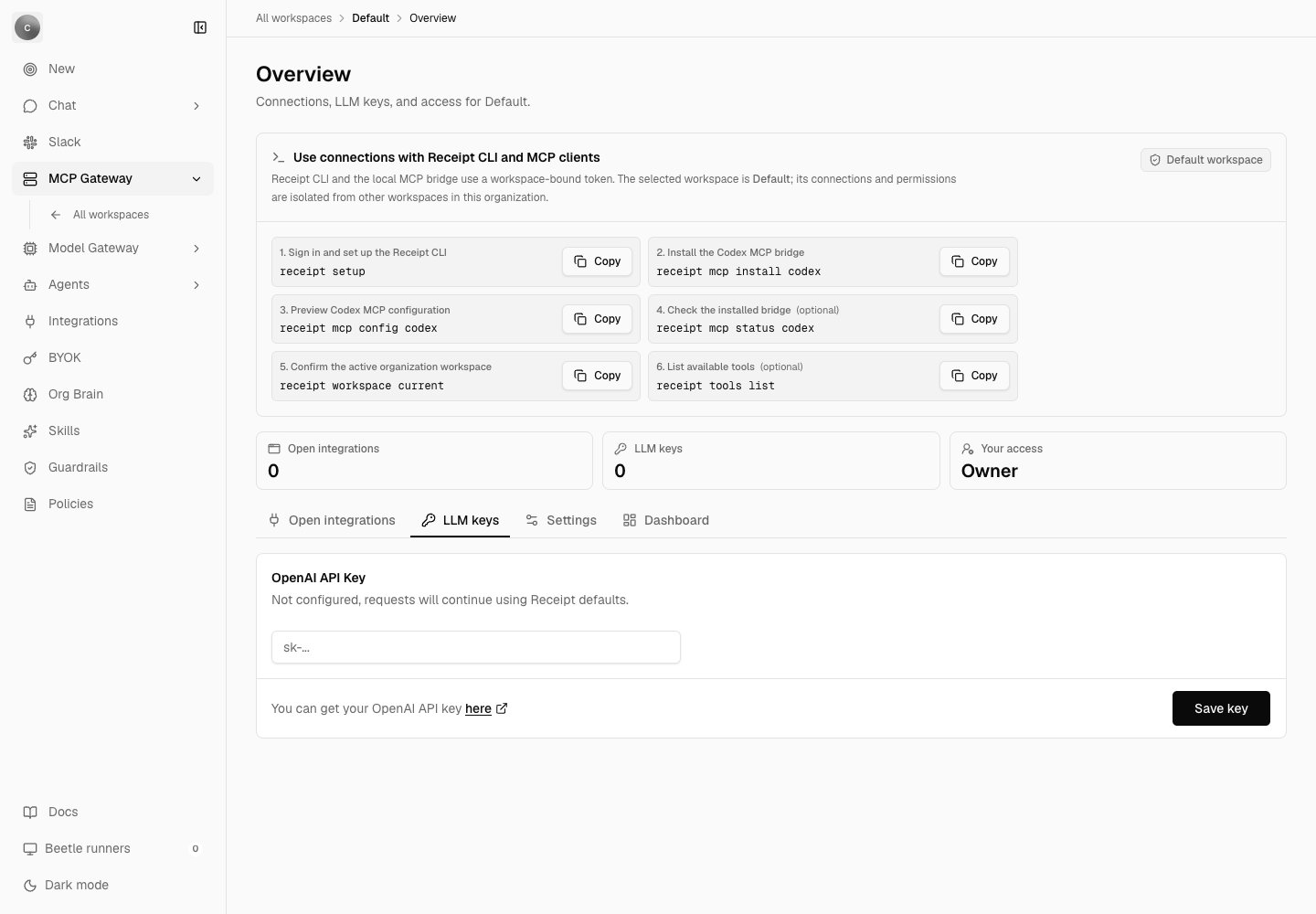 The consequence is worth stating plainly, because it looks like a bug when you meet it: **a key saved from the organization BYOK page is not visible from a named workspace, and a key saved against a named workspace is not visible to any path that resolves through the organization scope.** Isolation between the two is exact, and organizations never see each other's keys. If you are looking for a key you are sure you saved, check which scope you saved it in. For the difference between the two containers, see [Organizations and workspaces](/core/organizations-and-workspaces).
Which scope a caller reads follows from whether it has a workspace at all:
| Caller | Scope read |
| ----------------------- | ------------------------------------------------------------------------------------ |
| A web chat turn | The request's workspace (Default when you have not picked one) |
| Thread title generation | The chat turn's own key when the turn resolved one; otherwise the organization scope |
| Attachment embeddings | The organization scope |
| Factory background runs | The organization scope, unless the run's funding lookup is given a workspace |
**A workspace-scoped key can be short-circuited by an organization-level snapshot, so verify this against your own deployment before relying on it.** Saving or removing a key always rewrites a provider-key summary on the organization policy row from the **organization** scope, even when the key you saved belongs to a named workspace. Chat resolution consults that summary before it looks for any BYOK key: once the summary has been written at least once and reports no provider key anywhere, resolution stops and the turn runs on platform credit without ever looking for the workspace key. On an organization whose policy row still carries the untouched default — nothing has been saved or removed yet — the summary is not trusted, resolution falls through, and the workspace key is used.
This is read from the implementation rather than measured on a live deployment. Until you have confirmed the behaviour on your own install, the reliable arrangement is to save an organization-scope key on the BYOK page as well as any workspace keys you need.
## How the key is stored
Keys live in the `org_provider_api_key` table, keyed by organization, workspace and provider. The row holds ciphertext, an initialization vector, an authentication tag, a key version and timestamps. It never holds plaintext.
Encryption is AES-256-GCM with a 32-byte wrapping key and a 12-byte random IV, written at key version 1. The wrapping key does not come from the database — it comes from deployment configuration, in the environment variable `BYOK_ENCRYPTION_KEY_B64`, so that a database-only leak is not enough to recover a provider credential. [Gateway configuration](/llm-gateway/configuration) lists the errors that variable produces when it is missing or the wrong length, and why rotating it after keys have been saved destroys them.
The only value derived from the key that is ever written to a log is a **fingerprint** — the first 12 hexadecimal characters of a SHA-256 of the key. It is not reversible and it is not a prefix of the key. The structured logs around the key path carry that fingerprint and nothing secret.
**Do not rotate `BYOK_ENCRYPTION_KEY_B64` once keys have been saved.** Every stored provider key becomes permanently undecryptable and each organization has to re-enter its keys by hand. The same applies to `RECEIPT_CONNECTION_ENCRYPTION_KEY_B64`, the wrapping key for Receipt Connect connection references. See [Gateway configuration](/llm-gateway/configuration).
## Which credential actually pays for a request
Once a model has cleared the catalog and [policy](/llm-gateway/model-policy) checks, Receipt resolves the credential in this order:
1. **A workspace Models account credential.** If the request carries a workspace and a user, and a configured [Models account](/llm-gateway/models-and-providers) resolves to a credential that can route this model, that key is used. Models accounts win over everything below, and they are the one path the organization snapshot cannot short-circuit.
2. **A short-circuit to platform credit.** If strict mode is off and the organization's provider-key summary has been written at least once and says there is no key anywhere, resolution stops here with no override.
3. **The BYOK key at the request's scope.** Candidate providers are taken from the model's own declared provider list, filtered down to the providers BYOK can actually execute against, and evaluated in that declared order. A provider the summary marks as unconfigured is skipped. The first candidate with a resolvable key wins and becomes the request's provider-key override.
4. **Otherwise, platform credit.** No override; the request falls through to the platform-funded route, which calls OpenAI with the deployment's own `OPENAI_API_KEY`.
When an override is present the contract is absolute: runtime model execution must use that key and must not fall back to system credentials.
A request that carries an override is also exempt from Receipt's spend controls — it reserves nothing against the signup credit or a seat budget, because the money is being spent on your provider account rather than the platform's. See [Usage and spend](/llm-gateway/usage-and-spend).
## Strict mode
Setting the environment variable `CHAT_REQUIRE_BYOK=true` makes an organization or workspace provider key mandatory instead of preferred: the lookup reads the request's workspace scope when the turn carries a workspace and the organization scope otherwise. Strict mode disables the step 2 short-circuit to platform credit, but step 3 still applies: a provider the organization-scope summary marks as unconfigured is passed over, the trap described above under *Where a key lives*. It ships as `false`, and [Gateway configuration](/llm-gateway/configuration) covers the variable itself.
Strict mode adds three denials that cannot otherwise occur, each carrying a machine-readable reason:
| Reason | Condition |
| ----------------------------------------------------------- | -------------------------------------------------------- |
| `policy_denied:missing_org_context_for_provider_key` | The request has no organization context. |
| `policy_denied:provider_not_supported_by_byok:{providerId}` | The model has no provider that BYOK can execute against. |
| `policy_denied:missing_provider_api_key:{providerId}` | No key is configured for any candidate provider. |
Those reasons are what distinguish the three denials. The last of them is the one that reaches the chat as **"This provider requires an organization API key, but no key is configured."**; the other two do not produce that string. A key that is present but rejected by the provider at execution time surfaces differently, as **"Unable to connect to the AI service. Verify that your organization OpenAI API key is valid."** Both, and the rest of the chat error vocabulary, are in [Errors and limits](/co-worker/errors-and-limits).
## Saving a key can switch ZDR off for that provider
If your organization has **Require ZDR (Zero Data Retention)** turned on, saving a BYOK key opens a confirmation dialog first:
* Title — **"Disable ZDR for this provider?"**
* Body — **"Your organization requires ZDR right now. Saving a {providerName} API key will turn off ZDR enforcement for {providerName} requests that use your org key. Other providers keep their current ZDR behavior."**
* Confirm — **"Save key and disable ZDR"**
That dialog is describing real behaviour, not hedging. An active, executable organization provider key sets a compliance bypass, and the ZDR check is skipped for a model routed through that provider. Other providers keep enforcing it. If you accepted that dialog, your ZDR guarantee for that one provider is gone until you remove the key.
Next step: [set the provider and compliance policy around your key](/llm-gateway/model-policy).
The consequence is worth stating plainly, because it looks like a bug when you meet it: **a key saved from the organization BYOK page is not visible from a named workspace, and a key saved against a named workspace is not visible to any path that resolves through the organization scope.** Isolation between the two is exact, and organizations never see each other's keys. If you are looking for a key you are sure you saved, check which scope you saved it in. For the difference between the two containers, see [Organizations and workspaces](/core/organizations-and-workspaces).
Which scope a caller reads follows from whether it has a workspace at all:
| Caller | Scope read |
| ----------------------- | ------------------------------------------------------------------------------------ |
| A web chat turn | The request's workspace (Default when you have not picked one) |
| Thread title generation | The chat turn's own key when the turn resolved one; otherwise the organization scope |
| Attachment embeddings | The organization scope |
| Factory background runs | The organization scope, unless the run's funding lookup is given a workspace |
**A workspace-scoped key can be short-circuited by an organization-level snapshot, so verify this against your own deployment before relying on it.** Saving or removing a key always rewrites a provider-key summary on the organization policy row from the **organization** scope, even when the key you saved belongs to a named workspace. Chat resolution consults that summary before it looks for any BYOK key: once the summary has been written at least once and reports no provider key anywhere, resolution stops and the turn runs on platform credit without ever looking for the workspace key. On an organization whose policy row still carries the untouched default — nothing has been saved or removed yet — the summary is not trusted, resolution falls through, and the workspace key is used.
This is read from the implementation rather than measured on a live deployment. Until you have confirmed the behaviour on your own install, the reliable arrangement is to save an organization-scope key on the BYOK page as well as any workspace keys you need.
## How the key is stored
Keys live in the `org_provider_api_key` table, keyed by organization, workspace and provider. The row holds ciphertext, an initialization vector, an authentication tag, a key version and timestamps. It never holds plaintext.
Encryption is AES-256-GCM with a 32-byte wrapping key and a 12-byte random IV, written at key version 1. The wrapping key does not come from the database — it comes from deployment configuration, in the environment variable `BYOK_ENCRYPTION_KEY_B64`, so that a database-only leak is not enough to recover a provider credential. [Gateway configuration](/llm-gateway/configuration) lists the errors that variable produces when it is missing or the wrong length, and why rotating it after keys have been saved destroys them.
The only value derived from the key that is ever written to a log is a **fingerprint** — the first 12 hexadecimal characters of a SHA-256 of the key. It is not reversible and it is not a prefix of the key. The structured logs around the key path carry that fingerprint and nothing secret.
**Do not rotate `BYOK_ENCRYPTION_KEY_B64` once keys have been saved.** Every stored provider key becomes permanently undecryptable and each organization has to re-enter its keys by hand. The same applies to `RECEIPT_CONNECTION_ENCRYPTION_KEY_B64`, the wrapping key for Receipt Connect connection references. See [Gateway configuration](/llm-gateway/configuration).
## Which credential actually pays for a request
Once a model has cleared the catalog and [policy](/llm-gateway/model-policy) checks, Receipt resolves the credential in this order:
1. **A workspace Models account credential.** If the request carries a workspace and a user, and a configured [Models account](/llm-gateway/models-and-providers) resolves to a credential that can route this model, that key is used. Models accounts win over everything below, and they are the one path the organization snapshot cannot short-circuit.
2. **A short-circuit to platform credit.** If strict mode is off and the organization's provider-key summary has been written at least once and says there is no key anywhere, resolution stops here with no override.
3. **The BYOK key at the request's scope.** Candidate providers are taken from the model's own declared provider list, filtered down to the providers BYOK can actually execute against, and evaluated in that declared order. A provider the summary marks as unconfigured is skipped. The first candidate with a resolvable key wins and becomes the request's provider-key override.
4. **Otherwise, platform credit.** No override; the request falls through to the platform-funded route, which calls OpenAI with the deployment's own `OPENAI_API_KEY`.
When an override is present the contract is absolute: runtime model execution must use that key and must not fall back to system credentials.
A request that carries an override is also exempt from Receipt's spend controls — it reserves nothing against the signup credit or a seat budget, because the money is being spent on your provider account rather than the platform's. See [Usage and spend](/llm-gateway/usage-and-spend).
## Strict mode
Setting the environment variable `CHAT_REQUIRE_BYOK=true` makes an organization or workspace provider key mandatory instead of preferred: the lookup reads the request's workspace scope when the turn carries a workspace and the organization scope otherwise. Strict mode disables the step 2 short-circuit to platform credit, but step 3 still applies: a provider the organization-scope summary marks as unconfigured is passed over, the trap described above under *Where a key lives*. It ships as `false`, and [Gateway configuration](/llm-gateway/configuration) covers the variable itself.
Strict mode adds three denials that cannot otherwise occur, each carrying a machine-readable reason:
| Reason | Condition |
| ----------------------------------------------------------- | -------------------------------------------------------- |
| `policy_denied:missing_org_context_for_provider_key` | The request has no organization context. |
| `policy_denied:provider_not_supported_by_byok:{providerId}` | The model has no provider that BYOK can execute against. |
| `policy_denied:missing_provider_api_key:{providerId}` | No key is configured for any candidate provider. |
Those reasons are what distinguish the three denials. The last of them is the one that reaches the chat as **"This provider requires an organization API key, but no key is configured."**; the other two do not produce that string. A key that is present but rejected by the provider at execution time surfaces differently, as **"Unable to connect to the AI service. Verify that your organization OpenAI API key is valid."** Both, and the rest of the chat error vocabulary, are in [Errors and limits](/co-worker/errors-and-limits).
## Saving a key can switch ZDR off for that provider
If your organization has **Require ZDR (Zero Data Retention)** turned on, saving a BYOK key opens a confirmation dialog first:
* Title — **"Disable ZDR for this provider?"**
* Body — **"Your organization requires ZDR right now. Saving a {providerName} API key will turn off ZDR enforcement for {providerName} requests that use your org key. Other providers keep their current ZDR behavior."**
* Confirm — **"Save key and disable ZDR"**
That dialog is describing real behaviour, not hedging. An active, executable organization provider key sets a compliance bypass, and the ZDR check is skipped for a model routed through that provider. Other providers keep enforcing it. If you accepted that dialog, your ZDR guarantee for that one provider is gone until you remove the key.
Next step: [set the provider and compliance policy around your key](/llm-gateway/model-policy).