> ## Documentation Index
> Fetch the complete documentation index at: https://docs.kentron.ai/llms.txt
> Use this file to discover all available pages before exploring further.
# What the AI Co-Worker does
> How Receipt handles a goal you give it in plain language, from a direct answer to a background run whose every step is recorded as a receipt you can replay.
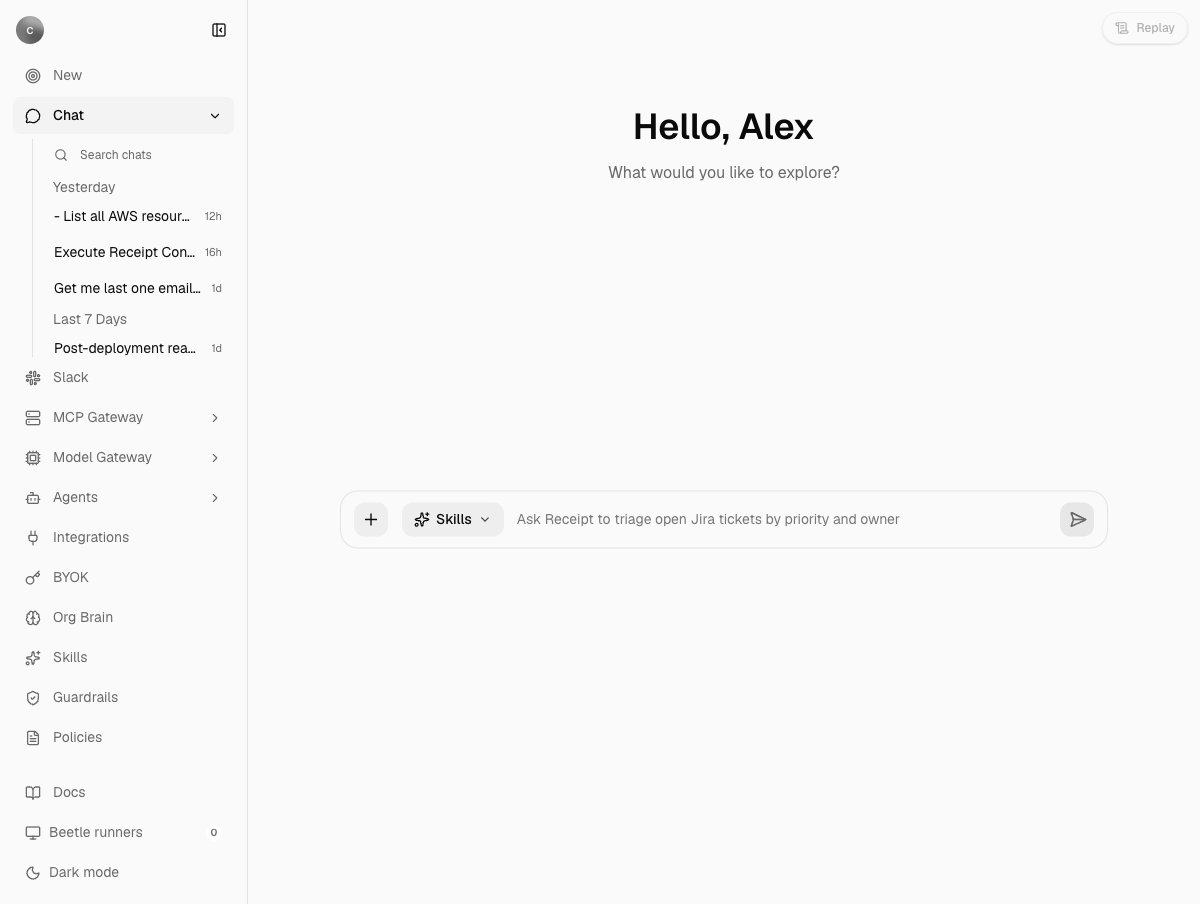
Receipt is the AI co-worker in Kentron. You give it a goal in plain language, in the web chat, in Slack or in Teams, and it either answers straight away or plans and executes the work in the background across the apps your organization has connected, then reports back in the same thread. Every step of a background run is recorded as a hash-chained receipt you can replay afterwards.
 ## What you can do
Learn the composer control by control, then send a question and read the reply streamed into the thread.
Work that needs live data from a connected app, a repository or a terminal becomes a durable objective that outlives your tab.
Open Agent replay on any thread or task to see goal, plan, work, commands, evidence and result rebuilt from receipts.
Pick an enabled organization skill from the composer, or ask Receipt to draft a new one.
Mention Receipt in a channel; it edits one progress message as the run advances and posts a link to the receipt.
Mention Receipt and get an acknowledgement, then a single result message when the run finishes.
Tasks lists objectives, Computers shows sandbox capacity and live execution output, and Sessions reviews imported agent sessions.
The routing step, the background path through Factory, and where the gateways sit.
Also in this section: [conversations](/co-worker/conversations), for editing, branching and searching your threads; [files and attachments](/co-worker/files-and-attachments), for what you can upload and how it reaches the model; [objectives and tasks](/co-worker/objectives-and-tasks), for the vocabulary behind every run; and [errors and limits](/co-worker/errors-and-limits), for the exact wording of every message Receipt can show you.
## Three ways a message is handled
Every message first goes through a routing step that returns one decision and does nothing else: it never writes an answer and never calls a tool.
1. **Answer directly.** Chosen when your message can be answered from the visible conversation and what Receipt knows about your connections. The reply is streamed into the thread with no tools attached.
2. **Draft or save a skill.** Chosen when you ask for a brand-new organization skill. A draft appears in the thread; it is saved only when you explicitly ask, and saving needs an owner or admin. Web chat only.
3. **Run in the background.** Chosen when the answer "requires current private, local, repository, terminal, connected-account, or other external evidence". Naming an app is not enough; a question about a public API is still a direct answer. The thread shows `Beetle queued job .` ([Beetle](/introduction) is the interface's name for the assistant), then progress lines, then the result. Read-only work runs as an *investigation*; anything that creates, updates or deletes, edits code or configuration, deploys, opens a pull request or produces a downloadable file runs as a *delivery*.
If routing cannot settle on a decision it asks once more, then stops without queuing anything. Web chat replies `Beetle stopped before completing this response.` with `Reason: Receipt couldn't determine the access needed for this request. Please retry; no task was started.`; Slack posts that sentence on its own. Teams is the exception and falls back to a background run; see [Receipt in Teams](/co-worker/teams). The routing step and the gates around it are described in full on [how it works](/co-worker/how-it-works).
## Read-only by default, and what that does not mean
Every connected app exposes operations classified as read or write. Read operations are enabled by default. Write operations are off until an owner or admin enables them for that connection under **Manage tools** on the Integrations page. Saving that dialog replaces the default with an explicit list, so from then on the connection exposes exactly the operations on it, reads included. A background run that needs an app nobody has connected, or one whose saved list is empty, never starts: the thread replies with what to connect or enable instead. [Background runs](/co-worker/background-runs) quotes each reply.
That list is the whole gate. A background run is granted write access whenever its objective needs a connected app, so once a write operation is enabled a delivery run can call it without asking you first.
**There is no per-action approval prompt in this release.** Receipt never pauses to ask whether it may perform an action, on any channel or inside a run. The **Tool approval** screen under Policies describes agents waiting for an approver, but its rules are stored and not applied. Guardrail rules can be authored, versioned and tested against sample text; they are not applied to live traffic in this release. What is enforced is the per-connection tool list, model and compliance policy, and the sandbox every run executes in. See [Guard](/guard/overview) and [tools and permissions](/mcp-gateway/tools-and-permissions).
## Limits to know before you start
| Limit | What it means |
| ---------------- | ---------------------------------------------------------------------------------------------------------------------------------------------------------------------------------------------------------------------------------------------------------------------------------------------------------------------------------------------------------------------------------------------------------------------------------------------------------------------- |
| Model | No model or reasoning picker. Every chat uses your organization's default OpenAI-routed model; the `+` menu offers Study Mode (a study system prompt on one fixed model, with provider tools switched off) and, when the model has a larger context window, Max, but no model choice. The model Study Mode pins has no route this release can execute, so a turn sent in it ends in an error rather than an answer; see [your first chat](/co-worker/your-first-chat). |
| Tools checkboxes | The Tools entries in the `+` menu record a preference but do not change what runs: direct answers attach no provider tools, and background runs do not read them. |
| Connected apps | 63 connectable apps, inside a browsable directory of about 900. A run is scoped to the apps the routing step selects; it never selects every connected app as a fallback. |
| Channels | Slack must be installed by an organization owner or admin. Both channels need an organization OpenAI key before a mention can be routed, and Teams posts no progress updates. |
Rate limits, context limits and the exact messages behind each of these are in [errors and limits](/co-worker/errors-and-limits).
## How it fits
* Receipt's own model calls pass through the [LLM Gateway](/llm-gateway/overview), one policy and credential checkpoint. There is no external endpoint for other applications.
* Connected apps are reached through the [MCP Gateway](/mcp-gateway/overview). Provider credentials stay in Nango; a run fetches short-lived credentials at call time rather than receiving the stored provider secret.
* Background runs execute in Factory: an objective is planned into tasks, each executed by the Codex CLI inside a disposable sandbox computer. See [how it works](/co-worker/how-it-works) and the [Factory engine](/core/factory-engine).
* Skills, connectors and the agent inventory live in the [Catalog](/catalog/overview).
* Receipts are SHA-256 hash-chained and verified on replay; every view is rebuilt from them. See [receipts and streams](/core/receipts-and-streams).
Next step: [send your first chat](/co-worker/your-first-chat).
## What you can do
Learn the composer control by control, then send a question and read the reply streamed into the thread.
Work that needs live data from a connected app, a repository or a terminal becomes a durable objective that outlives your tab.
Open Agent replay on any thread or task to see goal, plan, work, commands, evidence and result rebuilt from receipts.
Pick an enabled organization skill from the composer, or ask Receipt to draft a new one.
Mention Receipt in a channel; it edits one progress message as the run advances and posts a link to the receipt.
Mention Receipt and get an acknowledgement, then a single result message when the run finishes.
Tasks lists objectives, Computers shows sandbox capacity and live execution output, and Sessions reviews imported agent sessions.
The routing step, the background path through Factory, and where the gateways sit.
Also in this section: [conversations](/co-worker/conversations), for editing, branching and searching your threads; [files and attachments](/co-worker/files-and-attachments), for what you can upload and how it reaches the model; [objectives and tasks](/co-worker/objectives-and-tasks), for the vocabulary behind every run; and [errors and limits](/co-worker/errors-and-limits), for the exact wording of every message Receipt can show you.
## Three ways a message is handled
Every message first goes through a routing step that returns one decision and does nothing else: it never writes an answer and never calls a tool.
1. **Answer directly.** Chosen when your message can be answered from the visible conversation and what Receipt knows about your connections. The reply is streamed into the thread with no tools attached.
2. **Draft or save a skill.** Chosen when you ask for a brand-new organization skill. A draft appears in the thread; it is saved only when you explicitly ask, and saving needs an owner or admin. Web chat only.
3. **Run in the background.** Chosen when the answer "requires current private, local, repository, terminal, connected-account, or other external evidence". Naming an app is not enough; a question about a public API is still a direct answer. The thread shows `Beetle queued job .` ([Beetle](/introduction) is the interface's name for the assistant), then progress lines, then the result. Read-only work runs as an *investigation*; anything that creates, updates or deletes, edits code or configuration, deploys, opens a pull request or produces a downloadable file runs as a *delivery*.
If routing cannot settle on a decision it asks once more, then stops without queuing anything. Web chat replies `Beetle stopped before completing this response.` with `Reason: Receipt couldn't determine the access needed for this request. Please retry; no task was started.`; Slack posts that sentence on its own. Teams is the exception and falls back to a background run; see [Receipt in Teams](/co-worker/teams). The routing step and the gates around it are described in full on [how it works](/co-worker/how-it-works).
## Read-only by default, and what that does not mean
Every connected app exposes operations classified as read or write. Read operations are enabled by default. Write operations are off until an owner or admin enables them for that connection under **Manage tools** on the Integrations page. Saving that dialog replaces the default with an explicit list, so from then on the connection exposes exactly the operations on it, reads included. A background run that needs an app nobody has connected, or one whose saved list is empty, never starts: the thread replies with what to connect or enable instead. [Background runs](/co-worker/background-runs) quotes each reply.
That list is the whole gate. A background run is granted write access whenever its objective needs a connected app, so once a write operation is enabled a delivery run can call it without asking you first.
**There is no per-action approval prompt in this release.** Receipt never pauses to ask whether it may perform an action, on any channel or inside a run. The **Tool approval** screen under Policies describes agents waiting for an approver, but its rules are stored and not applied. Guardrail rules can be authored, versioned and tested against sample text; they are not applied to live traffic in this release. What is enforced is the per-connection tool list, model and compliance policy, and the sandbox every run executes in. See [Guard](/guard/overview) and [tools and permissions](/mcp-gateway/tools-and-permissions).
## Limits to know before you start
| Limit | What it means |
| ---------------- | ---------------------------------------------------------------------------------------------------------------------------------------------------------------------------------------------------------------------------------------------------------------------------------------------------------------------------------------------------------------------------------------------------------------------------------------------------------------------- |
| Model | No model or reasoning picker. Every chat uses your organization's default OpenAI-routed model; the `+` menu offers Study Mode (a study system prompt on one fixed model, with provider tools switched off) and, when the model has a larger context window, Max, but no model choice. The model Study Mode pins has no route this release can execute, so a turn sent in it ends in an error rather than an answer; see [your first chat](/co-worker/your-first-chat). |
| Tools checkboxes | The Tools entries in the `+` menu record a preference but do not change what runs: direct answers attach no provider tools, and background runs do not read them. |
| Connected apps | 63 connectable apps, inside a browsable directory of about 900. A run is scoped to the apps the routing step selects; it never selects every connected app as a fallback. |
| Channels | Slack must be installed by an organization owner or admin. Both channels need an organization OpenAI key before a mention can be routed, and Teams posts no progress updates. |
Rate limits, context limits and the exact messages behind each of these are in [errors and limits](/co-worker/errors-and-limits).
## How it fits
* Receipt's own model calls pass through the [LLM Gateway](/llm-gateway/overview), one policy and credential checkpoint. There is no external endpoint for other applications.
* Connected apps are reached through the [MCP Gateway](/mcp-gateway/overview). Provider credentials stay in Nango; a run fetches short-lived credentials at call time rather than receiving the stored provider secret.
* Background runs execute in Factory: an objective is planned into tasks, each executed by the Codex CLI inside a disposable sandbox computer. See [how it works](/co-worker/how-it-works) and the [Factory engine](/core/factory-engine).
* Skills, connectors and the agent inventory live in the [Catalog](/catalog/overview).
* Receipts are SHA-256 hash-chained and verified on replay; every view is rebuilt from them. See [receipts and streams](/core/receipts-and-streams).
Next step: [send your first chat](/co-worker/your-first-chat).