> ## Documentation Index
> Fetch the complete documentation index at: https://docs.kentron.ai/llms.txt
> Use this file to discover all available pages before exploring further.
# Kentron Catalog
> The four inventories Receipt keeps for an organization — cloud agents, connectable apps, skills and usage — and the things none of them do.
The Catalog answers one question: what does this organization actually have? Four inventories hold the answer — the AI agents already running in your cloud accounts, the apps you can connect, the instructions your agents follow, and the figures that show which applications your work actually used.
Nothing here is a store you install from. Each surface is an inventory of what is already true, and the scans and skill changes behind it are written as [receipts](/guard/receipts-and-audit) — the tamper-evident records Receipt keeps of what happened, with an actor and a time.
New to Kentron? Start with [What Kentron is](/introduction).
## The four inventories
Scan connected AWS, Azure and Google Cloud accounts for AI agents and agent-like workloads, then review each one's autonomy level, risk and owner.
63 connectors you can actually connect, inside a browsable directory of about 900 entries, each connection carrying its own read and write allowlist.
Versioned `SKILL.md` instructions, enabled or disabled for the organization and mounted read-only into every new run.
Runs, spend and which applications your objectives used over the last 30, 60 or 90 days, plus the URL-only organization knowledge store.
Writing the file itself has its own page: [write a SKILL.md](/catalog/writing-a-skill), the contract every uploaded skill has to satisfy.
## What each surface shows
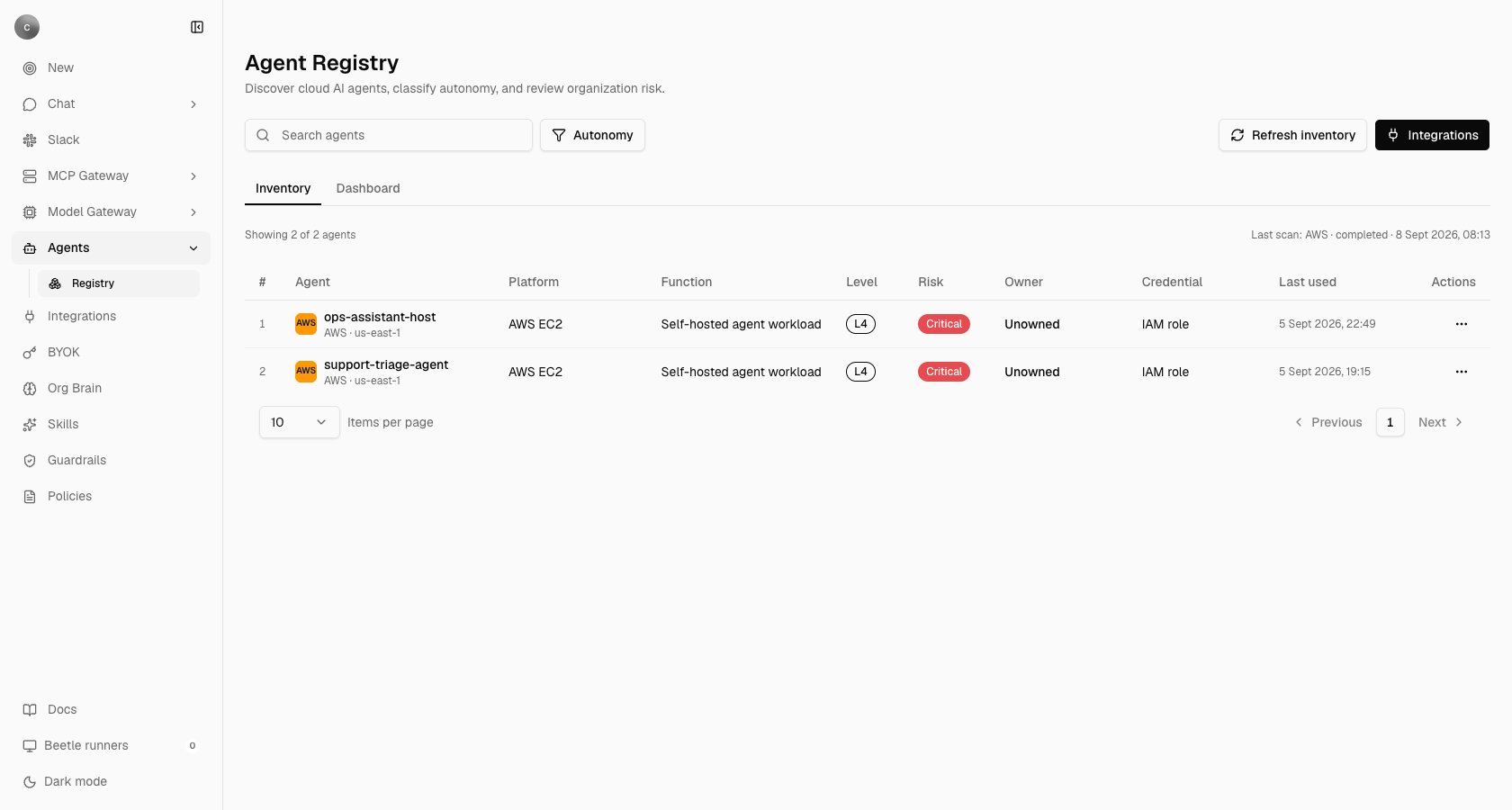
**Agent Registry** — **"Discover cloud AI agents, classify autonomy, and review organization risk."** Connect a cloud account, run a scan, and the Inventory tab fills with what was found: the platform each agent runs on, what it appears to do, an autonomy level, a risk level and an owner. Owner is read from a cloud tag, or on AWS from the creator recorded in CloudTrail, and reads **Unowned** when neither exists. Scans run only when someone starts one — there is no schedule, webhook or CLI trigger — and the registry's cloud credentials live in their own connection, so discovery access is never reused as a chat connection.
**Global Integrations** — the organization's connector page, where an app is connected once for the whole organization and becomes available to Receipt chat; [connect an app](/mcp-gateway/connect-an-app) quotes the page's own description in full and covers the workspace-scoped alternative. You can search and filter about 900 directory entries; only the 63 connectors Receipt ships can actually be connected, and every other card is display-only. Once connected, the card's **Manage tools** button opens the per-connection allowlist — a dialog titled **Manage tools and permissions** — which decides which read operations and which write and delete operations that connection may perform; see [tools and permissions](/mcp-gateway/tools-and-permissions).
**Skills** — **"Add organization instructions that agents can use in Factory and computer runs. Enabled skills are available to new runs."** Factory is the engine behind a background run: it plans a goal into a graph of tasks and executes each one inside a disposable computer — see [how a turn is processed](/co-worker/how-it-works) and [inside the Factory engine](/core/factory-engine). Each skill is one `SKILL.md` upload; re-uploading changed content adds a version. Enabled skills are snapshotted into every new run as a read-only catalog, and the agent chooses which entries to open — there is no ranking, no keyword matching, and no receipt recording which skill was read.
**Org Brain** — **"A shared view of how knowledge and tools connect across the organization."** It reports over a 30-, 60- or 90-day window and refreshes automatically, with tiles for **Runs**, **Job success**, **In progress**, **Connected apps**, **Avg duration** and **Total spend**. Anything that was not measured reads **Not recorded** rather than zero. Per-call figures — per tool, per connector, per actor — live in [gateway activity](/mcp-gateway/gateway-activity) instead. **Organization Knowledge**, a separate document store reachable only by typing its URL, is documented on [Org Brain and knowledge](/catalog/org-brain).
 ## Who can open what
| Surface | Who can open | Who can change |
| -------------------------------------------------------- | ---------------------------------------------------------------------------------------- | ---------------------------------------------------------------------------------------------------------------- |
| Agent Registry | Any signed-in organization member | Owner or admin, to connect a cloud, scan or disconnect |
| Global Integrations | Owner or admin | Owner or admin |
| [Workspace integrations](/mcp-gateway/connection-scopes) | Any organization member reaches the gateway; workspace membership decides what is listed | Workspace owner or admin |
| Skills | Owner or admin | Owner or admin — the server refuses anyone else with **"Only organization owners or admins can manage skills."** |
| Org Brain | Owner or admin | Read-only |
The roles are the organization roles owner, admin and member. There is no catalog curator and no per-connector reviewer; see [access control](/guard/access-control).
## What the Catalog is not
* **No approval or vetting workflow.** A connector is connectable or it is not, a skill is enabled or disabled, an agent is discovered. Nothing carries an approved or vetted state, and nobody reviews an entry before it can be used. The **Tool approval** screen under Policies describes agents waiting for an approver, but it stores rules that no runtime path reads yet — see [policies](/guard/policies).
* **No dependency graph.** Nothing models or displays a relationship between a connector, a skill and an agent.
* **No plugins and no marketplace.** Neither concept exists in the product.
* **No per-skill or per-agent usage counts.** Org Brain counts objectives per application; nothing counts skill reads or agent invocations, and the registry's **Last used** column is a modification, creation or launch time reported by the cloud provider, not telemetry.
* **No way to add an entry by hand.** New connectors are code changes: when a search matches nothing, Global Integrations offers `Build {name} with Beetle Tasks` — Beetle is the assistant's name in the interface — which files a development task rather than enabling anything.
What you do get is provenance. Every scan and every skill change — a new version, an enable, a disable, a delete — is recorded as a receipt with an actor and a time, replayable later. Connecting or disconnecting an app is not itself recorded as a receipt: see [receipts and audit](/guard/receipts-and-audit) for what is and is not.
Next step: [see the agents already running in your cloud accounts](/catalog/agent-registry).
## Who can open what
| Surface | Who can open | Who can change |
| -------------------------------------------------------- | ---------------------------------------------------------------------------------------- | ---------------------------------------------------------------------------------------------------------------- |
| Agent Registry | Any signed-in organization member | Owner or admin, to connect a cloud, scan or disconnect |
| Global Integrations | Owner or admin | Owner or admin |
| [Workspace integrations](/mcp-gateway/connection-scopes) | Any organization member reaches the gateway; workspace membership decides what is listed | Workspace owner or admin |
| Skills | Owner or admin | Owner or admin — the server refuses anyone else with **"Only organization owners or admins can manage skills."** |
| Org Brain | Owner or admin | Read-only |
The roles are the organization roles owner, admin and member. There is no catalog curator and no per-connector reviewer; see [access control](/guard/access-control).
## What the Catalog is not
* **No approval or vetting workflow.** A connector is connectable or it is not, a skill is enabled or disabled, an agent is discovered. Nothing carries an approved or vetted state, and nobody reviews an entry before it can be used. The **Tool approval** screen under Policies describes agents waiting for an approver, but it stores rules that no runtime path reads yet — see [policies](/guard/policies).
* **No dependency graph.** Nothing models or displays a relationship between a connector, a skill and an agent.
* **No plugins and no marketplace.** Neither concept exists in the product.
* **No per-skill or per-agent usage counts.** Org Brain counts objectives per application; nothing counts skill reads or agent invocations, and the registry's **Last used** column is a modification, creation or launch time reported by the cloud provider, not telemetry.
* **No way to add an entry by hand.** New connectors are code changes: when a search matches nothing, Global Integrations offers `Build {name} with Beetle Tasks` — Beetle is the assistant's name in the interface — which files a development task rather than enabling anything.
What you do get is provenance. Every scan and every skill change — a new version, an enable, a disable, a delete — is recorded as a receipt with an actor and a time, replayable later. Connecting or disconnecting an app is not itself recorded as a receipt: see [receipts and audit](/guard/receipts-and-audit) for what is and is not.
Next step: [see the agents already running in your cloud accounts](/catalog/agent-registry).