> ## Documentation Index
> Fetch the complete documentation index at: https://docs.kentron.ai/llms.txt
> Use this file to discover all available pages before exploring further.
# Agent Registry
> Discover the AI agents and agent-like workloads running in your connected AWS, Azure and Google Cloud accounts, and review their autonomy, ownership and risk.
**The Agent Registry is a read-only inventory.** It discovers agents in the cloud accounts you connect, classifies them, and records every scan as a receipt. It does not register, approve, edit, re-assign, quarantine or stop anything — the only row action is **View details**, and nothing in Receipt acts on the risk levels or findings it produces. Scans run only when a person starts one: there is no schedule, webhook or CLI trigger.
Connect a cloud account and Receipt scans it for AI agents and for the workloads that behave like them, then puts each one in a single table: what it runs on, how autonomous it is, who owns it, what its credentials can reach, and what to do about it. Owners and admins connect and scan; every member of the organization can read the result.
## Where it lives
**Agents → Registry** in the sidebar. The page is headed **Agent Registry**, "Discover cloud AI agents, classify autonomy, and review organization risk.", and has two tabs, **Inventory** and **Dashboard**. The open tab is part of the URL, so a refresh or a shared link comes back to the same view, and older bookmarks to the standalone dashboard land on the Dashboard tab. A crash inside the area leaves the rest of the app standing and shows **"Agent Registry couldn't load."** with the error and a **Try again** button.
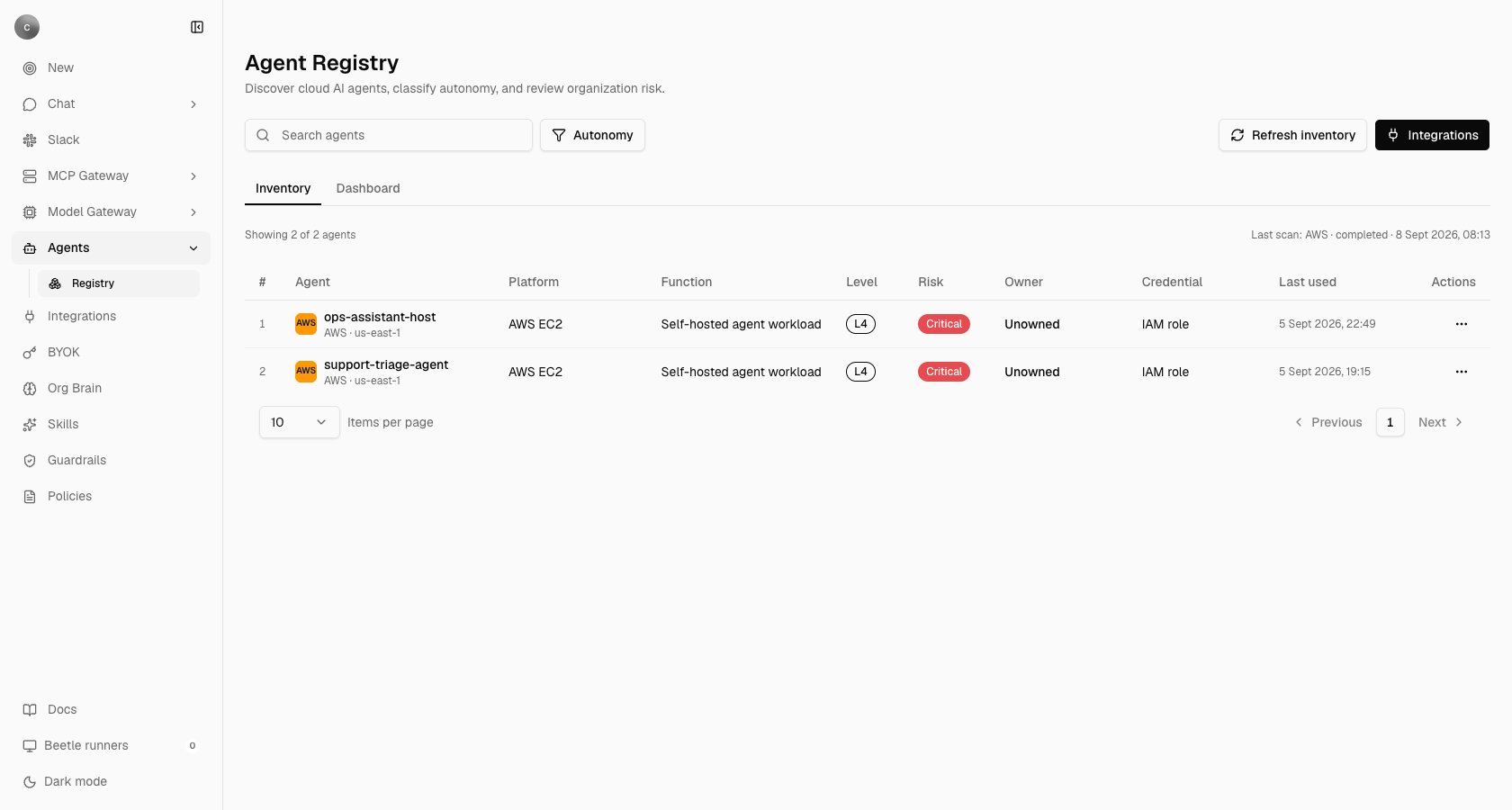 The columns are a row number, **Agent** (provider badge, name, and `AWS · us-east-1` underneath), **Platform**, **Function**, **Level**, **Risk**, **Owner**, **Credential**, **Last used** and **Actions**. Clicking an agent — or **View details** in its row menu — opens that agent's register entry, the read-only detail dialog described below. **Search agents** matches name, resource id, platform, function, owner and region; the **Autonomy** button filters by level (L1 to L4, defined below); the table pages client-side at 10, 25, 50 or 100 rows. Above it, `Showing 2 of 2 agents` sits opposite `Last scan: AWS · completed · 8 Sept 2026, 08:13`, which reads **"No scans yet"** before the first scan and carries a warning triangle when the last one failed. Every timestamp on this page is rendered in UTC, with the date written the way your browser's locale writes it.
An empty table reads **"No agents discovered yet. Connect a cloud account and scan its inventory."**, or **"No agents match this search and filter."** when a search or filter is active.
## Connect a cloud account
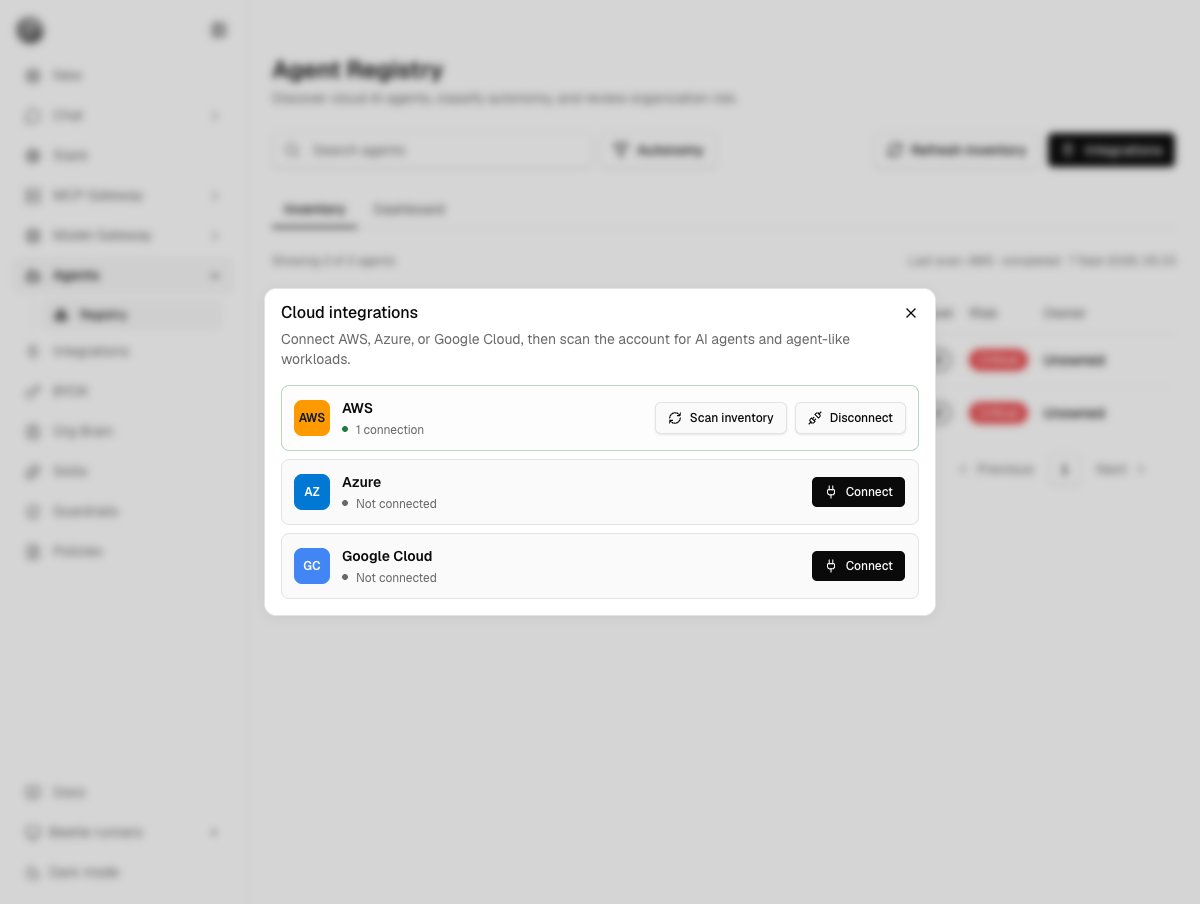
Press **Integrations** in the page header. The dialog is titled **Cloud integrations** — "Connect AWS, Azure, or Google Cloud, then scan the account for AI agents and agent-like workloads." Each provider card shows **"1 connection"**, **"3 connections"**, **"Reconnect required"** or **"Not connected"**.
**Connect** opens the provider's credential form inside the dialog, under the line "Credentials are collected and stored by Nango. Receipt keeps only the connection reference." Nango is the integration provider that holds every connection's credentials on Receipt's behalf, so what Receipt stores is a pointer, not your keys.
On success you get `AWS connected.` and an immediate scan: `AWS scan completed: 4 agents found.`, or `AWS scan completed: 0 agents found. Check the connected account's permissions and region if agents are deployed there.` A connection that works but cannot read anything reports `AWS connected, but inventory scanning needs attention: ` — connecting and discovering are separate outcomes, and a failing scan never invalidates a good connection.
The columns are a row number, **Agent** (provider badge, name, and `AWS · us-east-1` underneath), **Platform**, **Function**, **Level**, **Risk**, **Owner**, **Credential**, **Last used** and **Actions**. Clicking an agent — or **View details** in its row menu — opens that agent's register entry, the read-only detail dialog described below. **Search agents** matches name, resource id, platform, function, owner and region; the **Autonomy** button filters by level (L1 to L4, defined below); the table pages client-side at 10, 25, 50 or 100 rows. Above it, `Showing 2 of 2 agents` sits opposite `Last scan: AWS · completed · 8 Sept 2026, 08:13`, which reads **"No scans yet"** before the first scan and carries a warning triangle when the last one failed. Every timestamp on this page is rendered in UTC, with the date written the way your browser's locale writes it.
An empty table reads **"No agents discovered yet. Connect a cloud account and scan its inventory."**, or **"No agents match this search and filter."** when a search or filter is active.
## Connect a cloud account
Press **Integrations** in the page header. The dialog is titled **Cloud integrations** — "Connect AWS, Azure, or Google Cloud, then scan the account for AI agents and agent-like workloads." Each provider card shows **"1 connection"**, **"3 connections"**, **"Reconnect required"** or **"Not connected"**.
**Connect** opens the provider's credential form inside the dialog, under the line "Credentials are collected and stored by Nango. Receipt keeps only the connection reference." Nango is the integration provider that holds every connection's credentials on Receipt's behalf, so what Receipt stores is a pointer, not your keys.
On success you get `AWS connected.` and an immediate scan: `AWS scan completed: 4 agents found.`, or `AWS scan completed: 0 agents found. Check the connected account's permissions and region if agents are deployed there.` A connection that works but cannot read anything reports `AWS connected, but inventory scanning needs attention: ` — connecting and discovering are separate outcomes, and a failing scan never invalidates a good connection.
 The registry uses its own connection, named `agent-registry`. Connecting AWS here never reuses, and is never reused by, the connection on [Global Integrations](/catalog/connectors), which hides `agent-registry` connections from its list — connecting a cloud there is a different act with a different purpose, publishing read tools to chat and MCP clients. See [Receipt Connect](/mcp-gateway/receipt-connect) for how a connection is stored and addressed, and [connection scopes](/mcp-gateway/connection-scopes) for where one lives.
| Provider | Credential you supply | What one scan covers |
| ---------------- | ----------------------------------------------------------------------------------------------------------------------------------------------- | ---------------------------------------------------------------------------------------------------------------------------------------------------------------------------- |
| **AWS** | IAM access key and secret | Every region the account reports as enabled. The form has no region field, so in practice that is the enabled-region list; without permission to read it, `us-east-1` alone. |
| **Azure** | Service principal: **Client ID**, **Client Secret**, **Directory (tenant) ID** and **Subscription ID** | The subscription on the connection if it carries one, otherwise every enabled subscription the principal can see, queried in batches of 50. |
| **Google Cloud** | OAuth sign-in, requesting `https://www.googleapis.com/auth/cloud-platform.read-only` and `https://www.googleapis.com/auth/devstorage.read_only` | Every active project the token can list. |
## Permissions to grant
Everything the scanner calls is read-only. Grant less and the scan still runs — it just leaves columns blank, which looks identical to "nothing to report".
Attach this as a customer-managed policy to the role or user behind the connection.
```json theme={null}
{
"Version": "2012-10-17",
"Statement": [
{
"Sid": "RegionEnumeration",
"Effect": "Allow",
"Action": ["ec2:DescribeRegions"],
"Resource": "*"
},
{
"Sid": "AgentAndWorkloadDiscovery",
"Effect": "Allow",
"Action": [
"bedrock:ListAgents",
"bedrock:GetAgent",
"bedrock:ListAgentActionGroups",
"bedrock:GetAgentActionGroup",
"bedrock:ListTagsForResource",
"bedrock-agentcore:ListAgentRuntimes",
"bedrock-agentcore:ListTagsForResource",
"lambda:ListFunctions",
"lambda:ListTags",
"states:ListStateMachines",
"states:DescribeStateMachine",
"states:ListTagsForResource",
"ec2:DescribeInstances",
"ecs:ListClusters",
"ecs:ListServices",
"ecs:DescribeServices"
],
"Resource": "*"
},
{
"Sid": "PermissionsAndDataAccessIntrospection",
"Effect": "Allow",
"Action": [
"iam:GetRole",
"iam:GetInstanceProfile",
"iam:ListAttachedRolePolicies",
"iam:ListRolePolicies",
"iam:GetRolePolicy",
"iam:GetPolicy",
"iam:GetPolicyVersion"
],
"Resource": "*"
},
{
"Sid": "OwnerAttributionFallback",
"Effect": "Allow",
"Action": ["cloudtrail:LookupEvents"],
"Resource": "*"
}
]
}
```
| Trim this | And you lose |
| ---------------------------------------------------------------------------------------------------- | ------------------------------------------------------------------------------------------------------------- |
| `ec2:DescribeRegions` | Every region except `us-east-1` |
| `bedrock:ListAgents` / `GetAgent` | Bedrock Agents entirely, plus their purpose and execution role |
| `bedrock:ListAgentActionGroups` / `GetAgentActionGroup` | The real autonomy signal for Bedrock Agents — an L3 is then reported as L4 |
| The tag reads (`lambda:ListTags`, `*:ListTagsForResource`) | The tag-based owner record, so attribution falls through to role tags and CloudTrail |
| A discovery action (`bedrock-agentcore:*`, `lambda:*`, `states:*`, `ec2:DescribeInstances`, `ecs:*`) | That whole resource type |
| `iam:GetInstanceProfile` / `iam:GetRole` | An EC2 agent's role, and ownership tags recorded on a role rather than a resource |
| The other `iam:*` reads | Permissions and data-access summaries, and wildcard-grant detection — every agent then under-reports its risk |
| `cloudtrail:LookupEvents` | Last-resort owner attribution: untagged resources stay **Unowned** permanently |
Assign the service principal the **Reader** role on the **management group** covering every subscription in scope, not on one subscription — the scanner enumerates subscriptions itself, and a principal scoped to a single subscription silently reports one subscription's agents.
Reader covers all three calls the scan makes: listing subscriptions, the Resource Graph query for agent resources, and a second Resource Graph query for resource-group tags, used for ownership.
Owner on Azure comes from resource tags and then resource-group tags, and from nothing else. Receipt's internal permissions note also lists the admin-consented Microsoft Graph application permission `Directory.Read.All` for resolving a service-principal object id to a readable name, but no part of the scan calls Microsoft Graph today, so granting it changes nothing you can see.
| Grant | Scope | Why |
| -------------------------------------------------------------------------------- | ---------------------- | -------------------------------------------------------------------------------------------------------------------------------------------------------------------------------------------------------------------------------------------------- |
| OAuth scopes `cloud-platform.read-only` and `devstorage.read_only` | the token | Requested by the connector at sign-in. `cloud-platform.read-only` is a Google-restricted scope, so a self-hosted deployment has to publish and verify its own consent screen before production or refresh tokens keep the seven-day testing limit. |
| `roles/browser`, or any role carrying `resourcemanager.projects.list` | organization or folder | Project enumeration. Without it the scan sees no projects and returns nothing. |
| `roles/cloudasset.viewer` | organization or folder | The agent query. Grant it at organization level, or new projects stay invisible until someone re-grants. |
| APIs enabled: `cloudasset.googleapis.com`, `cloudresourcemanager.googleapis.com` | each project | A disabled API is skipped silently so one project cannot fail the scan — but it looks exactly like "no agents here". |
## What a scan finds
Managed agent services are always listed. General compute is listed only when its name, description, labels or tags match a keyword signal — `ai`, `agent`, `llm`, `genai`, `copilot`, `assistant`, `langchain`, `crewai`, `autogen`, plus `factory`, `receipt` and `beetle` so Receipt's own self-hosted runners are not missed; Beetle is the assistant's name in the interface. That is a naming heuristic, with the consequences you would expect: an agent host called something else is missed, and an unrelated service with `ai` in its name is included.
Which fields are read varies by service. A Step Functions state machine is matched on its name alone; a Lambda on its name and description; EC2 instances, ECS services and every Azure resource on their name and tags; Google Cloud assets on name, description and labels.
| Provider | Always listed | Listed when the name, description or tags match |
| ---------------- | -------------------------------------------------------------- | ---------------------------------------------------------------------------------------------------------------- |
| **AWS** | Bedrock Agents, Bedrock AgentCore runtimes | Lambda functions, Step Functions state machines, EC2 instances (running or stopped), ECS services |
| **Google Cloud** | Vertex AI reasoning engines, Dialogflow / Agent Builder agents | Cloud Run services and jobs, Cloud Functions, GKE clusters, Compute Engine instances, Cloud Workflows |
| **Azure** | Azure OpenAI accounts, Azure AI Foundry workspaces | Azure Functions, Logic Apps, Container Apps, AKS clusters, Virtual Machines, Container Instances, Batch accounts |
## Autonomy levels
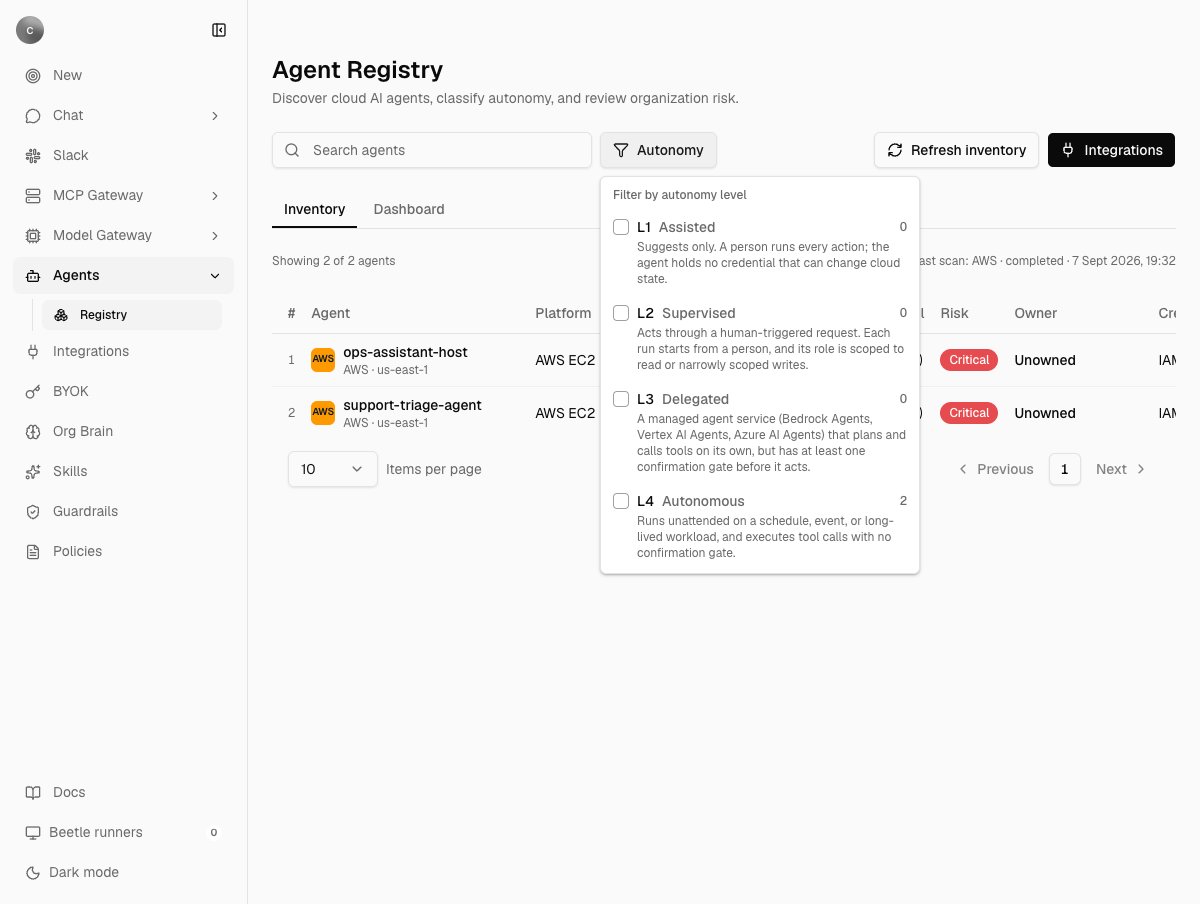
The four levels are defined once and shown wherever a level appears: in the filter, as the tooltip on the row badge, and under the badge in the detail dialog.
| Level | Name | Criteria |
| ------ | ---------- | --------------------------------------------------------------------------------------------------------------------------------------------------------------------------- |
| **L1** | Assisted | "Suggests only. A person runs every action; the agent holds no credential that can change cloud state." |
| **L2** | Supervised | "Acts through a human-triggered request. Each run starts from a person, and its role is scoped to read or narrowly scoped writes." |
| **L3** | Delegated | "A managed agent service (Bedrock Agents, Vertex AI Agents, Azure AI Agents) that plans and calls tools on its own, but has at least one confirmation gate before it acts." |
| **L4** | Autonomous | "Runs unattended on a schedule, event, or long-lived workload, and executes tool calls with no confirmation gate." |
Levels come from what the provider reports, not from anything you set. A managed agent service on Google Cloud or Azure is **L3**. Everything else discovered — Lambda, Step Functions, EC2, ECS, Cloud Run, Compute Engine, Azure Functions, VMs — runs unattended by nature and is **L4**. Bedrock Agents get a real capability signal instead of that default: the scan inspects up to five enabled action groups. No enabled action group makes the agent **L2**; any function that explicitly disables confirmation makes it **L4**; anything else — including an action group defined by an OpenAPI schema, which carries no per-operation confirmation field — makes it **L3**. If those calls fail, the agent keeps the coarse L4 default.
**Nothing the scanner discovers is ever classified L1**, since an agent holding no credential that can change cloud state leaves nothing to discover it by. The L1 row in the filter is real and will always count zero. The Dashboard labels the same levels differently — `L4 Autonomous`, `L3 Approval`, `L2 Advise`, `L1 Observe` — while the filter, badge and dialog use the names above.
The registry uses its own connection, named `agent-registry`. Connecting AWS here never reuses, and is never reused by, the connection on [Global Integrations](/catalog/connectors), which hides `agent-registry` connections from its list — connecting a cloud there is a different act with a different purpose, publishing read tools to chat and MCP clients. See [Receipt Connect](/mcp-gateway/receipt-connect) for how a connection is stored and addressed, and [connection scopes](/mcp-gateway/connection-scopes) for where one lives.
| Provider | Credential you supply | What one scan covers |
| ---------------- | ----------------------------------------------------------------------------------------------------------------------------------------------- | ---------------------------------------------------------------------------------------------------------------------------------------------------------------------------- |
| **AWS** | IAM access key and secret | Every region the account reports as enabled. The form has no region field, so in practice that is the enabled-region list; without permission to read it, `us-east-1` alone. |
| **Azure** | Service principal: **Client ID**, **Client Secret**, **Directory (tenant) ID** and **Subscription ID** | The subscription on the connection if it carries one, otherwise every enabled subscription the principal can see, queried in batches of 50. |
| **Google Cloud** | OAuth sign-in, requesting `https://www.googleapis.com/auth/cloud-platform.read-only` and `https://www.googleapis.com/auth/devstorage.read_only` | Every active project the token can list. |
## Permissions to grant
Everything the scanner calls is read-only. Grant less and the scan still runs — it just leaves columns blank, which looks identical to "nothing to report".
Attach this as a customer-managed policy to the role or user behind the connection.
```json theme={null}
{
"Version": "2012-10-17",
"Statement": [
{
"Sid": "RegionEnumeration",
"Effect": "Allow",
"Action": ["ec2:DescribeRegions"],
"Resource": "*"
},
{
"Sid": "AgentAndWorkloadDiscovery",
"Effect": "Allow",
"Action": [
"bedrock:ListAgents",
"bedrock:GetAgent",
"bedrock:ListAgentActionGroups",
"bedrock:GetAgentActionGroup",
"bedrock:ListTagsForResource",
"bedrock-agentcore:ListAgentRuntimes",
"bedrock-agentcore:ListTagsForResource",
"lambda:ListFunctions",
"lambda:ListTags",
"states:ListStateMachines",
"states:DescribeStateMachine",
"states:ListTagsForResource",
"ec2:DescribeInstances",
"ecs:ListClusters",
"ecs:ListServices",
"ecs:DescribeServices"
],
"Resource": "*"
},
{
"Sid": "PermissionsAndDataAccessIntrospection",
"Effect": "Allow",
"Action": [
"iam:GetRole",
"iam:GetInstanceProfile",
"iam:ListAttachedRolePolicies",
"iam:ListRolePolicies",
"iam:GetRolePolicy",
"iam:GetPolicy",
"iam:GetPolicyVersion"
],
"Resource": "*"
},
{
"Sid": "OwnerAttributionFallback",
"Effect": "Allow",
"Action": ["cloudtrail:LookupEvents"],
"Resource": "*"
}
]
}
```
| Trim this | And you lose |
| ---------------------------------------------------------------------------------------------------- | ------------------------------------------------------------------------------------------------------------- |
| `ec2:DescribeRegions` | Every region except `us-east-1` |
| `bedrock:ListAgents` / `GetAgent` | Bedrock Agents entirely, plus their purpose and execution role |
| `bedrock:ListAgentActionGroups` / `GetAgentActionGroup` | The real autonomy signal for Bedrock Agents — an L3 is then reported as L4 |
| The tag reads (`lambda:ListTags`, `*:ListTagsForResource`) | The tag-based owner record, so attribution falls through to role tags and CloudTrail |
| A discovery action (`bedrock-agentcore:*`, `lambda:*`, `states:*`, `ec2:DescribeInstances`, `ecs:*`) | That whole resource type |
| `iam:GetInstanceProfile` / `iam:GetRole` | An EC2 agent's role, and ownership tags recorded on a role rather than a resource |
| The other `iam:*` reads | Permissions and data-access summaries, and wildcard-grant detection — every agent then under-reports its risk |
| `cloudtrail:LookupEvents` | Last-resort owner attribution: untagged resources stay **Unowned** permanently |
Assign the service principal the **Reader** role on the **management group** covering every subscription in scope, not on one subscription — the scanner enumerates subscriptions itself, and a principal scoped to a single subscription silently reports one subscription's agents.
Reader covers all three calls the scan makes: listing subscriptions, the Resource Graph query for agent resources, and a second Resource Graph query for resource-group tags, used for ownership.
Owner on Azure comes from resource tags and then resource-group tags, and from nothing else. Receipt's internal permissions note also lists the admin-consented Microsoft Graph application permission `Directory.Read.All` for resolving a service-principal object id to a readable name, but no part of the scan calls Microsoft Graph today, so granting it changes nothing you can see.
| Grant | Scope | Why |
| -------------------------------------------------------------------------------- | ---------------------- | -------------------------------------------------------------------------------------------------------------------------------------------------------------------------------------------------------------------------------------------------- |
| OAuth scopes `cloud-platform.read-only` and `devstorage.read_only` | the token | Requested by the connector at sign-in. `cloud-platform.read-only` is a Google-restricted scope, so a self-hosted deployment has to publish and verify its own consent screen before production or refresh tokens keep the seven-day testing limit. |
| `roles/browser`, or any role carrying `resourcemanager.projects.list` | organization or folder | Project enumeration. Without it the scan sees no projects and returns nothing. |
| `roles/cloudasset.viewer` | organization or folder | The agent query. Grant it at organization level, or new projects stay invisible until someone re-grants. |
| APIs enabled: `cloudasset.googleapis.com`, `cloudresourcemanager.googleapis.com` | each project | A disabled API is skipped silently so one project cannot fail the scan — but it looks exactly like "no agents here". |
## What a scan finds
Managed agent services are always listed. General compute is listed only when its name, description, labels or tags match a keyword signal — `ai`, `agent`, `llm`, `genai`, `copilot`, `assistant`, `langchain`, `crewai`, `autogen`, plus `factory`, `receipt` and `beetle` so Receipt's own self-hosted runners are not missed; Beetle is the assistant's name in the interface. That is a naming heuristic, with the consequences you would expect: an agent host called something else is missed, and an unrelated service with `ai` in its name is included.
Which fields are read varies by service. A Step Functions state machine is matched on its name alone; a Lambda on its name and description; EC2 instances, ECS services and every Azure resource on their name and tags; Google Cloud assets on name, description and labels.
| Provider | Always listed | Listed when the name, description or tags match |
| ---------------- | -------------------------------------------------------------- | ---------------------------------------------------------------------------------------------------------------- |
| **AWS** | Bedrock Agents, Bedrock AgentCore runtimes | Lambda functions, Step Functions state machines, EC2 instances (running or stopped), ECS services |
| **Google Cloud** | Vertex AI reasoning engines, Dialogflow / Agent Builder agents | Cloud Run services and jobs, Cloud Functions, GKE clusters, Compute Engine instances, Cloud Workflows |
| **Azure** | Azure OpenAI accounts, Azure AI Foundry workspaces | Azure Functions, Logic Apps, Container Apps, AKS clusters, Virtual Machines, Container Instances, Batch accounts |
## Autonomy levels
The four levels are defined once and shown wherever a level appears: in the filter, as the tooltip on the row badge, and under the badge in the detail dialog.
| Level | Name | Criteria |
| ------ | ---------- | --------------------------------------------------------------------------------------------------------------------------------------------------------------------------- |
| **L1** | Assisted | "Suggests only. A person runs every action; the agent holds no credential that can change cloud state." |
| **L2** | Supervised | "Acts through a human-triggered request. Each run starts from a person, and its role is scoped to read or narrowly scoped writes." |
| **L3** | Delegated | "A managed agent service (Bedrock Agents, Vertex AI Agents, Azure AI Agents) that plans and calls tools on its own, but has at least one confirmation gate before it acts." |
| **L4** | Autonomous | "Runs unattended on a schedule, event, or long-lived workload, and executes tool calls with no confirmation gate." |
Levels come from what the provider reports, not from anything you set. A managed agent service on Google Cloud or Azure is **L3**. Everything else discovered — Lambda, Step Functions, EC2, ECS, Cloud Run, Compute Engine, Azure Functions, VMs — runs unattended by nature and is **L4**. Bedrock Agents get a real capability signal instead of that default: the scan inspects up to five enabled action groups. No enabled action group makes the agent **L2**; any function that explicitly disables confirmation makes it **L4**; anything else — including an action group defined by an OpenAPI schema, which carries no per-operation confirmation field — makes it **L3**. If those calls fail, the agent keeps the coarse L4 default.
**Nothing the scanner discovers is ever classified L1**, since an agent holding no credential that can change cloud state leaves nothing to discover it by. The L1 row in the filter is real and will always count zero. The Dashboard labels the same levels differently — `L4 Autonomous`, `L3 Approval`, `L2 Advise`, `L1 Observe` — while the filter, badge and dialog use the names above.
 ## Risk, ownership and the register
| Risk | When |
| ------------ | ------------------------------------------------------------------------- |
| **critical** | L4 with no owner, or the execution role grants a wildcard action (`*`) |
| **high** | No owner, or L4, or at least one policy statement scoped to `Resource: *` |
| **medium** | Dormant — the provider's last timestamp is more than 30 days old |
| **low** | None of the above |
Because every generic workload is L4, an unowned one is critical and an owned one is still high. The classifier is stating what it can prove, not grading your estate.
**"Last used" is not usage telemetry.** It is whatever timestamp the provider reports for the resource — a Bedrock agent's update time, a Lambda's last-modified, an EC2 launch time, an ECS creation time. Azure supplies none, so Azure rows always read **Not reported** and can never count as dormant. Nothing here counts invocations.
### Why an agent shows Unowned
Ownership is read from the cloud, first hit wins, and there is no way to assign an owner in Receipt.
1. A tag or label on the resource whose key is `owner`, `team`, `managed-by`, `created-by`, `contact`, `maintainer` or `aws:createdBy` — the hyphens are optional.
2. The same keys on the resource's execution role (AWS Lambda, Step Functions and EC2 only), its resource group (Azure) or its project (Google Cloud), so one tag on a shared role or project attributes a whole fleet.
3. On AWS only, the CloudTrail creation event for the resource (`Create*`, `Run*`, `Register*`), reporting the identity that made it.
**Unowned** after all three means all three genuinely missed. Usually that is no owner tag anywhere — the honest answer, and worth fixing in the cloud rather than here — or CloudTrail event history reaching back only 90 days, so an older resource has no creation event left to read, or a missing `cloudtrail:LookupEvents`.
The CloudTrail step runs once per untagged AWS resource and walks up to five pages of 50 events looking for the creation event. Any failure — a missing permission, a throttled account — is swallowed so that one call cannot fail a whole scan, which makes it look exactly like "no data". Tag the resource, or its role, if you want attribution that does not depend on it.
### The register entry
The detail dialog holds **Agent ID**, **Connection**, **Autonomy and risk** with the level's criteria, **Owner**, **Credential**, **Purpose**, **Tools**, **Permissions**, **Data access**, **Description**, **Recommended action**, and a **Policy findings** box.
For AWS Bedrock Agents, Lambda functions, Step Functions and EC2 instances with an instance profile, the scan reads the execution role's attached and inline IAM policies and fills all three technical fields: **Tools** lists the AWS services the role can reach, with `All AWS services (wildcard)` first where a statement grants `*`; **Permissions** reads `12 allow statements across 3 policies.` plus `Grants a wildcard action (*) - least-privilege scoping is not in place.` where that applies; **Data access** lists up to ten named S3, DynamoDB, RDS, Secrets Manager, Systems Manager, OpenSearch, Redshift or Glue resources, and adds `At least one statement scopes to Resource: * - data access is not scoped to specific resources.` where a statement does. A Bedrock Agent's **Purpose** is its own instruction text.
Where a field cannot be filled, the row usually says why rather than showing a blank: AgentCore runtimes and ECS services report that the resource type's execution role is not resolved yet, an EC2 instance with no instance profile reports that it holds no role permissions to report, and both other clouds are explicit — "Permissions and data-access introspection for Azure is not implemented yet (needs Azure RBAC role-assignment resolution per managed identity)", and the equivalent line for Google Cloud. More permission will not fill those fields today.
The exception is a role the scan could not reach at all — an EC2 instance whose instance profile could not be resolved because `iam:GetInstanceProfile` is missing, for instance. There is no reason to report, so the three fields fall back to `No tools reported.`, `No permissions reported.` and `No resource-scoped data access reported.`, which reads the same as an agent that genuinely holds nothing. Check the `iam:*` grants before believing it.
## Risk, ownership and the register
| Risk | When |
| ------------ | ------------------------------------------------------------------------- |
| **critical** | L4 with no owner, or the execution role grants a wildcard action (`*`) |
| **high** | No owner, or L4, or at least one policy statement scoped to `Resource: *` |
| **medium** | Dormant — the provider's last timestamp is more than 30 days old |
| **low** | None of the above |
Because every generic workload is L4, an unowned one is critical and an owned one is still high. The classifier is stating what it can prove, not grading your estate.
**"Last used" is not usage telemetry.** It is whatever timestamp the provider reports for the resource — a Bedrock agent's update time, a Lambda's last-modified, an EC2 launch time, an ECS creation time. Azure supplies none, so Azure rows always read **Not reported** and can never count as dormant. Nothing here counts invocations.
### Why an agent shows Unowned
Ownership is read from the cloud, first hit wins, and there is no way to assign an owner in Receipt.
1. A tag or label on the resource whose key is `owner`, `team`, `managed-by`, `created-by`, `contact`, `maintainer` or `aws:createdBy` — the hyphens are optional.
2. The same keys on the resource's execution role (AWS Lambda, Step Functions and EC2 only), its resource group (Azure) or its project (Google Cloud), so one tag on a shared role or project attributes a whole fleet.
3. On AWS only, the CloudTrail creation event for the resource (`Create*`, `Run*`, `Register*`), reporting the identity that made it.
**Unowned** after all three means all three genuinely missed. Usually that is no owner tag anywhere — the honest answer, and worth fixing in the cloud rather than here — or CloudTrail event history reaching back only 90 days, so an older resource has no creation event left to read, or a missing `cloudtrail:LookupEvents`.
The CloudTrail step runs once per untagged AWS resource and walks up to five pages of 50 events looking for the creation event. Any failure — a missing permission, a throttled account — is swallowed so that one call cannot fail a whole scan, which makes it look exactly like "no data". Tag the resource, or its role, if you want attribution that does not depend on it.
### The register entry
The detail dialog holds **Agent ID**, **Connection**, **Autonomy and risk** with the level's criteria, **Owner**, **Credential**, **Purpose**, **Tools**, **Permissions**, **Data access**, **Description**, **Recommended action**, and a **Policy findings** box.
For AWS Bedrock Agents, Lambda functions, Step Functions and EC2 instances with an instance profile, the scan reads the execution role's attached and inline IAM policies and fills all three technical fields: **Tools** lists the AWS services the role can reach, with `All AWS services (wildcard)` first where a statement grants `*`; **Permissions** reads `12 allow statements across 3 policies.` plus `Grants a wildcard action (*) - least-privilege scoping is not in place.` where that applies; **Data access** lists up to ten named S3, DynamoDB, RDS, Secrets Manager, Systems Manager, OpenSearch, Redshift or Glue resources, and adds `At least one statement scopes to Resource: * - data access is not scoped to specific resources.` where a statement does. A Bedrock Agent's **Purpose** is its own instruction text.
Where a field cannot be filled, the row usually says why rather than showing a blank: AgentCore runtimes and ECS services report that the resource type's execution role is not resolved yet, an EC2 instance with no instance profile reports that it holds no role permissions to report, and both other clouds are explicit — "Permissions and data-access introspection for Azure is not implemented yet (needs Azure RBAC role-assignment resolution per managed identity)", and the equivalent line for Google Cloud. More permission will not fill those fields today.
The exception is a role the scan could not reach at all — an EC2 instance whose instance profile could not be resolved because `iam:GetInstanceProfile` is missing, for instance. There is no reason to report, so the three fields fall back to `No tools reported.`, `No permissions reported.` and `No resource-scoped data access reported.`, which reads the same as an agent that genuinely holds nothing. Check the `iam:*` grants before believing it.
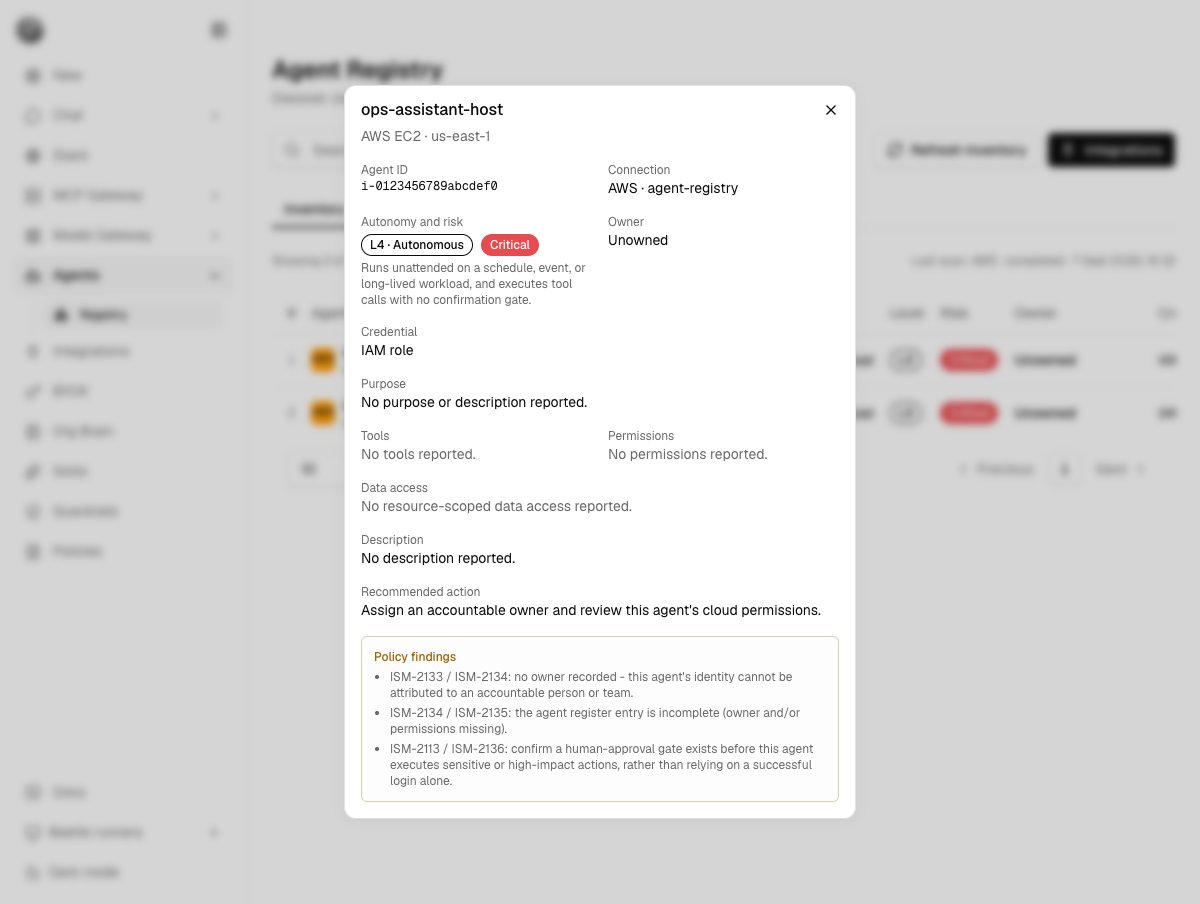 **Policy findings** appear only when the underlying signal was actually observed, never asserted for every agent. They quote control identifiers from a compliance framework a customer supplied, for example `ISM-2133 / ISM-2134: no owner recorded - this agent's identity cannot be attributed to an accountable person or team.` and `ISM-2141 / ISM-2143: this role grants a wildcard action (*) rather than the minimum required scope.` **Recommended action** is one sentence chosen by the same rules, such as `Assign an accountable owner and review this agent's cloud permissions.` Both are advice for a person; Receipt acts on neither.
## The Dashboard tab
**Policy findings** appear only when the underlying signal was actually observed, never asserted for every agent. They quote control identifiers from a compliance framework a customer supplied, for example `ISM-2133 / ISM-2134: no owner recorded - this agent's identity cannot be attributed to an accountable person or team.` and `ISM-2141 / ISM-2143: this role grants a wildcard action (*) rather than the minimum required scope.` **Recommended action** is one sentence chosen by the same rules, such as `Assign an accountable owner and review this agent's cloud permissions.` Both are advice for a person; Receipt acts on neither.
## The Dashboard tab
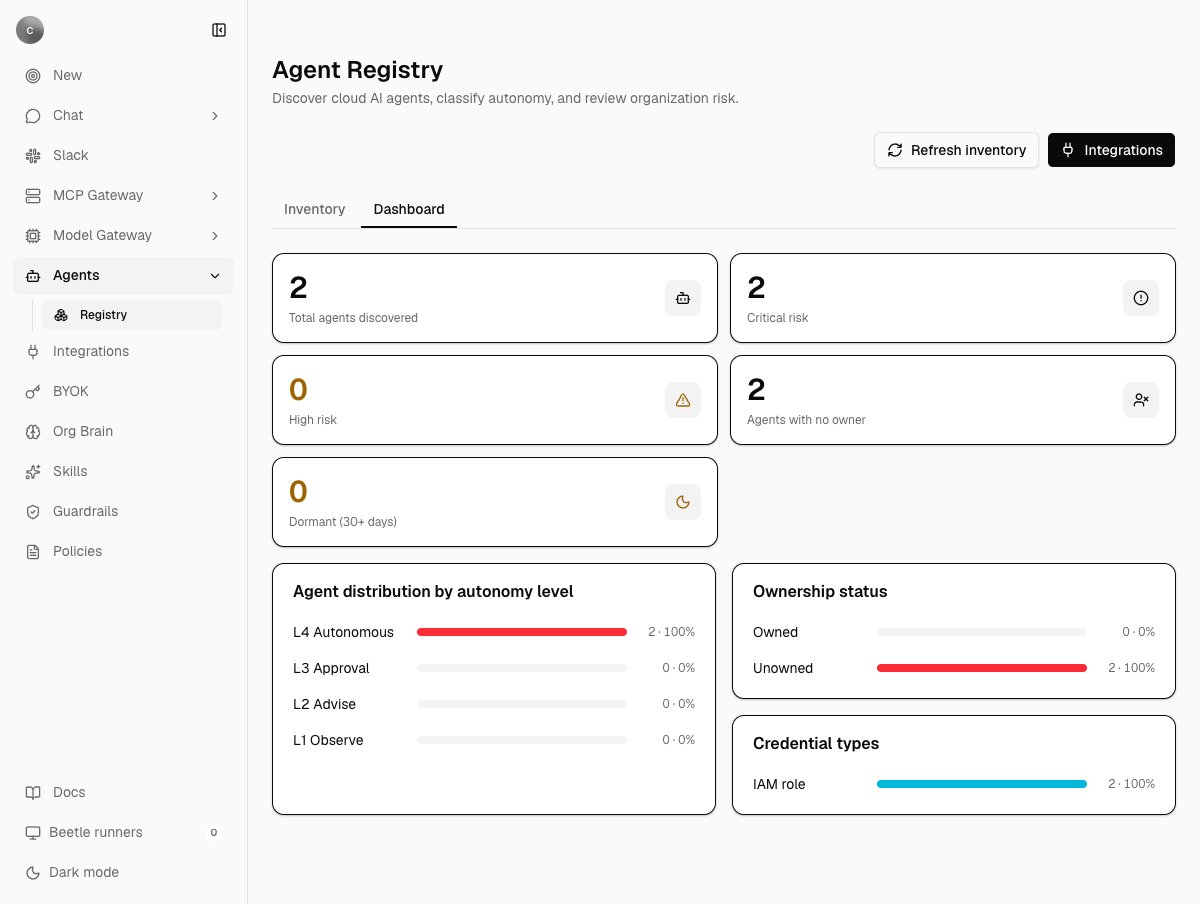 Five counts — **Total agents discovered**, **Critical risk**, **High risk**, **Agents with no owner**, **Dormant (30+ days)** — and three distributions: **Agent distribution by autonomy level**, **Ownership status**, and **Credential types**, each row reading a count and a share of the total, such as `2 · 100%` or `0 · 0%`. The credential label is a constant per provider rather than a per-agent observation: `IAM role` for AWS, `OAuth token` for Google Cloud, `Service principal` for Azure, and `No instance profile` for an EC2 instance without one. Before the first scan the tab reads **"Connect a cloud account and scan it to build the executive risk dashboard."** There are no trends and no per-provider breakdown.
## Scans, receipts and limits
A scan starts in one of three ways: automatically after a provider connects, from **Scan inventory** on a provider card, or from **Refresh inventory** in the page header, which scans every connected provider in turn and appears only for an owner or admin once at least one agent exists.
Each scan appends receipts to one stream per organization: `organization.agent_inventory.scan_requested`, then either `.scan_completed` carrying the full agent list or `.scan_failed` carrying a one-line, truncated error rather than a raw provider response. The table you read is a projection rebuilt by replaying that stream, so the inventory is reproducible from its receipts; see [receipts and audit](/guard/receipts-and-audit). A completed scan **replaces every agent belonging to that connection**, a failed one keeps the last good inventory and records the failure beside it, and scan history keeps the most recent 30.
Disconnecting a provider removes the connection but not the agents it discovered. They stay in the table and in the dashboard counts until a scan of another connection replaces them, and there is no way to purge them from the interface.
Worth knowing before scanning a large estate:
* Connections are scanned one at a time inside the request that started them. There is no overall time limit and no reaper for a scan whose process dies; that scan stays in a running state.
* Nothing prevents two admins from scanning at once.
* Each listing walks at most 20 pages per resource type per region, at most five action groups per Bedrock Agent, and shows at most ten named data-store resources per agent.
* Google Cloud and Azure requests time out after 30 seconds each.
* An AWS scan fails only when no supported service in any region could be read: `AWS inventory could not read any supported service.` followed by the per-service reasons. Everything else degrades to a blank field.
## Who can do what
| Action | Member | Owner or admin |
| -------------------------------------------------------------- | ------------------------------- | -------------- |
| Open Agents → Registry, read every row, open the detail dialog | Yes | Yes |
| Open the Cloud integrations dialog | Yes, with every button disabled | Yes |
| Connect, scan, refresh, disconnect | No | Yes |
The server enforces the same rule independently: a scan requested by anyone else fails with **"Only organization owners or admins can scan cloud agents."**
**Every member of the organization can read the whole register.** That includes owner identities resolved from CloudTrail, IAM permission and data-access summaries, named data-store resources, and a Bedrock Agent's instruction text shown as its purpose. Treat membership of the organization as the access boundary for this page, and see [access control](/guard/access-control).
## When something looks wrong
| What you see | Where to look first |
| ------------------------------------------------------------ | --------------------------------------------------------------------------------------------------------------- |
| A whole provider missing | A broken connection, a disabled discovery API (Google Cloud), or a principal scoped to one subscription (Azure) |
| Some AWS regions missing | `ec2:DescribeRegions` |
| Agents listed, all **Unowned** | Resource tags, then role, group or project tags, then CloudTrail — in that order |
| Tools and Permissions blank on AWS | The `iam:*` reads, `iam:GetInstanceProfile` included — that is the hop from an EC2 instance to its role |
| Tools and Permissions blank on Azure or Google Cloud | Expected today; introspection for those providers is not implemented |
| An agent you expect is not listed | A non-managed resource is only included when its name, description or tags match the keyword signal |
| `Connect AWS before scanning its agents.` | No valid `agent-registry` connection for that provider; connect it from the Integrations dialog |
| `This service principal cannot see any Azure subscriptions.` | The principal has no enabled subscription in view; assign Reader at management-group scope |
| `2 cloud scans failed. Open Integrations for details.` | Scan each provider on its own card to see its individual error |
Next step: [browse the connectors your organization can use](/catalog/connectors).
Five counts — **Total agents discovered**, **Critical risk**, **High risk**, **Agents with no owner**, **Dormant (30+ days)** — and three distributions: **Agent distribution by autonomy level**, **Ownership status**, and **Credential types**, each row reading a count and a share of the total, such as `2 · 100%` or `0 · 0%`. The credential label is a constant per provider rather than a per-agent observation: `IAM role` for AWS, `OAuth token` for Google Cloud, `Service principal` for Azure, and `No instance profile` for an EC2 instance without one. Before the first scan the tab reads **"Connect a cloud account and scan it to build the executive risk dashboard."** There are no trends and no per-provider breakdown.
## Scans, receipts and limits
A scan starts in one of three ways: automatically after a provider connects, from **Scan inventory** on a provider card, or from **Refresh inventory** in the page header, which scans every connected provider in turn and appears only for an owner or admin once at least one agent exists.
Each scan appends receipts to one stream per organization: `organization.agent_inventory.scan_requested`, then either `.scan_completed` carrying the full agent list or `.scan_failed` carrying a one-line, truncated error rather than a raw provider response. The table you read is a projection rebuilt by replaying that stream, so the inventory is reproducible from its receipts; see [receipts and audit](/guard/receipts-and-audit). A completed scan **replaces every agent belonging to that connection**, a failed one keeps the last good inventory and records the failure beside it, and scan history keeps the most recent 30.
Disconnecting a provider removes the connection but not the agents it discovered. They stay in the table and in the dashboard counts until a scan of another connection replaces them, and there is no way to purge them from the interface.
Worth knowing before scanning a large estate:
* Connections are scanned one at a time inside the request that started them. There is no overall time limit and no reaper for a scan whose process dies; that scan stays in a running state.
* Nothing prevents two admins from scanning at once.
* Each listing walks at most 20 pages per resource type per region, at most five action groups per Bedrock Agent, and shows at most ten named data-store resources per agent.
* Google Cloud and Azure requests time out after 30 seconds each.
* An AWS scan fails only when no supported service in any region could be read: `AWS inventory could not read any supported service.` followed by the per-service reasons. Everything else degrades to a blank field.
## Who can do what
| Action | Member | Owner or admin |
| -------------------------------------------------------------- | ------------------------------- | -------------- |
| Open Agents → Registry, read every row, open the detail dialog | Yes | Yes |
| Open the Cloud integrations dialog | Yes, with every button disabled | Yes |
| Connect, scan, refresh, disconnect | No | Yes |
The server enforces the same rule independently: a scan requested by anyone else fails with **"Only organization owners or admins can scan cloud agents."**
**Every member of the organization can read the whole register.** That includes owner identities resolved from CloudTrail, IAM permission and data-access summaries, named data-store resources, and a Bedrock Agent's instruction text shown as its purpose. Treat membership of the organization as the access boundary for this page, and see [access control](/guard/access-control).
## When something looks wrong
| What you see | Where to look first |
| ------------------------------------------------------------ | --------------------------------------------------------------------------------------------------------------- |
| A whole provider missing | A broken connection, a disabled discovery API (Google Cloud), or a principal scoped to one subscription (Azure) |
| Some AWS regions missing | `ec2:DescribeRegions` |
| Agents listed, all **Unowned** | Resource tags, then role, group or project tags, then CloudTrail — in that order |
| Tools and Permissions blank on AWS | The `iam:*` reads, `iam:GetInstanceProfile` included — that is the hop from an EC2 instance to its role |
| Tools and Permissions blank on Azure or Google Cloud | Expected today; introspection for those providers is not implemented |
| An agent you expect is not listed | A non-managed resource is only included when its name, description or tags match the keyword signal |
| `Connect AWS before scanning its agents.` | No valid `agent-registry` connection for that provider; connect it from the Integrations dialog |
| `This service principal cannot see any Azure subscriptions.` | The principal has no enabled subscription in view; assign Reader at management-group scope |
| `2 cloud scans failed. Open Integrations for details.` | Scan each provider on its own card to see its individual error |
Next step: [browse the connectors your organization can use](/catalog/connectors).